Policy Bypass Audit
Azure DevOps branch policies require reviewers, successful builds, comment resolution. Senior engineers and service accounts can be granted permission to bypass — and when they do, the event is logged. But reading the audit log requires admin access plus JSON parsing. This tool generates the compliance report your quarterly auditor asks for: bypass count over a configurable window, by actor, by repo, by reason, chronologically, with a green/amber verdict from threshold heuristics.
Bypass events are logged. The audit report isn't built.
The data exists. The report doesn't.
Azure DevOps logs every policy bypass via the Audit Log API. Reading it requires Project Collection Administrator access and JSON parsing. The DEV Community piece on rebuilding CI/CD after a failed audit names the standard governance heuristic:
"Bypass frequency tracked as a metric — if happening more than once a month, policies may be too restrictive." DEV Community · A Failed Compliance Audit in Azure DevOps
That's the metric quarterly auditors ask for. Eng managers regenerate it by hand from the Audit Log UI, copy-paste into a deck, cite the count.
Bypass concentration matters as much as bypass volume.
A team where five engineers each bypass twice has a different governance problem than a team where one engineer bypasses 10 times. Both totals are 10. The second is "concentrated risk in one person's judgment" -- which is a different conversation than "policies may be too restrictive." This tool surfaces both as separate compliance signals.
Aggregates don't pass an audit. The log does.
Compliance reviews don't accept "we had 18 bypasses last quarter." They accept "here is every bypass event, timestamp, actor, repo, PR, and reason." The chronological audit log is the artifact that gets attached to the SOC2 or FedRAMP evidence package. This tool produces it inline with the summary, so one HTML file is the whole submission.
This tool addresses all three: a local PowerShell script that reads policy-bypass events over a configurable window and produces a single self-contained HTML report with summary, compliance verdict, monthly timeline, by-actor / by-repo / by-reason breakdowns, and the full chronological audit log.
One page. Six sections. Verdict at the top.
The output is a single self-contained HTML file written to ./output/.
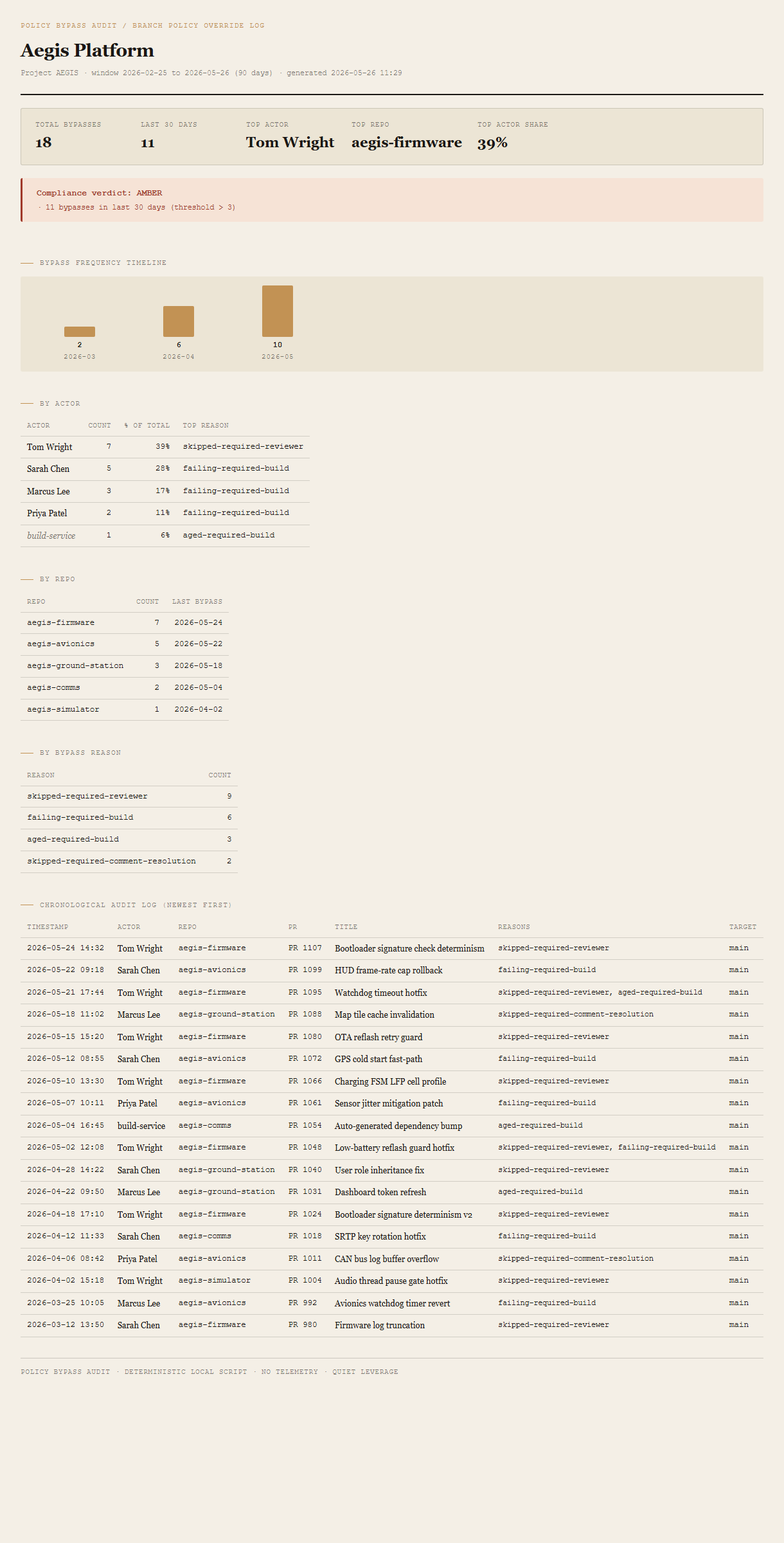
Summary header + compliance verdict
Totals, last-30-day count, top actor, top repo, top actor's share. The verdict block beneath shows GREEN or AMBER with the specific thresholds that triggered it.
Monthly timeline
Text-based bar chart showing bypass frequency per month across the window. Trend is the actionable signal — counts trending up are different from steady-state counts.
By-actor, by-repo, by-reason
Three small tables. By actor: who's bypassing, % of total, top reason. By repo: which codebase areas are accumulating bypasses, last bypass date. By reason: skipped reviewer / failing build / aged build / skipped comment-resolution.
Chronological audit log
Every event in the window, newest first. Timestamp, actor, repo, PR ID, PR title, reasons (comma-separated), target branch. The line-by-line artifact for the evidence package.
Requirements
- OSWindows, macOS, or Linux
- RuntimePowerShell 7+ (
pwsh). 5.1 is not supported. - BrowserAnything modern. UI on
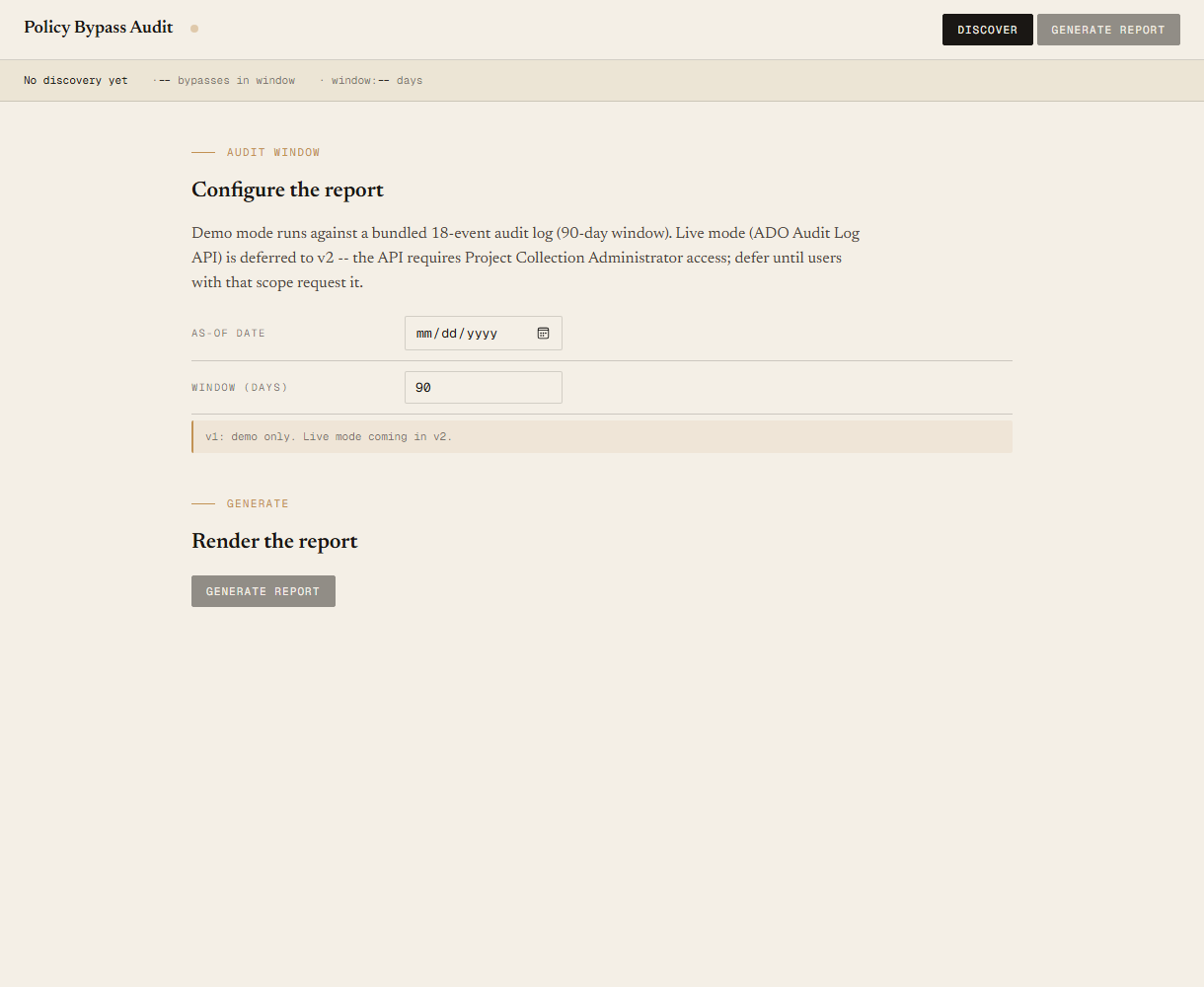
localhost:8779. - Azure DevOpsLive mode deferred to v2 — the ADO Audit Log API requires Project Collection Administrator access. v1 demonstrates the report shape on a bundled fixture.
- Demo modeBundled 18-event Aegis Platform fixture — 90-day window, runs end-to-end with no creds.
Claude could write this. Two reasons to prefer the script.
Some workplaces — defense, medical devices, finance, anywhere with a strict IT policy — won't let Claude or any AI tool touch production data. These tools run on your machine, with no Claude or AI in the data path. Vendor data (in this case, your Azure DevOps organization's audit log) flows direct from your machine to dev.azure.com and back — no third-party SaaS in between, no telemetry, no tokens leaving your environment. And even where AI is allowed, repeat workflows shouldn't cost tokens — a deterministic script runs the same way every time, for free, forever. The prompt guide below shows how this tool was built with Claude; the download is what you run after.
Three files. Free.
The tool, a user guide, and a prompt guide showing the spec, the threshold heuristics, the fixture engineering, and the Pester contract.
Drop your email to unlock the downloads.
One email when new tools ship, digest only. Confirms via Kit (double opt-in). No tracking. Unlocks every download on the site from this browser.
./start.ps1.