Cross-Space Workload Report
Portfolio Rollup organizes the rollup by List. Workload re-cuts the same portfolio by person. ClickUp's native Workload view is single-Space and gated behind the Business tier. This tool walks every open task across every Space, counts each assignee's load, overlays deadline pressure (overdue + due-7d), and surfaces who's overloaded across multiple Spaces simultaneously — the burnout signal cross-cluster dashboards hide.
Native Workload is single-Space + paid tier. The cross-Space load is what burns people out.
Portfolio Rollup hides who's doing what.
The standard ClickUp portfolio view (and the Portfolio Rollup entry in this cluster) is List-organized. It tells you "Mission Planner has 18 open tasks." It doesn't tell you Sarah is on 22 of those tasks across 3 different Spaces. The first view answers "what's the state of the project." The second answers "who's about to break."
Single-Space scope. Business+ tier. Both wrong.
ClickUp's built-in Workload view is genuinely useful inside a single Space. It hides at the Space boundary -- you can't see Sarah's load on Radar Firmware plus her load on Cybersecurity Compliance plus her cross-Space dependency work in Ground Software. The PMO running 5-10 Spaces gets to log into each Workload view individually and reconcile by hand. Or pay for the Business tier and hope the dashboard composes the picture (it doesn't, cleanly).
22 tasks is bad. 22 tasks with 5 overdue and 8 due this week is the conversation.
Open-task count alone undercounts the urgency. Two people with 14 open tasks each have very different load if one has zero overdue and the other has six. This tool computes deadline-pressure (overdue + due-in-7-days) as a separate column so the "what comes off the plate this week" conversation has both signals on screen.
This tool addresses all three: one local PowerShell script that reads every open task across every Space, aggregates by assignee, overlays deadline pressure, and renders a single self-contained HTML report with overload + at-capacity callouts and a GREEN/AMBER/RED verdict.
One page. Verdict + per-assignee table + Monday-morning at-risk list.
The output is a single self-contained HTML file written to ./output/.
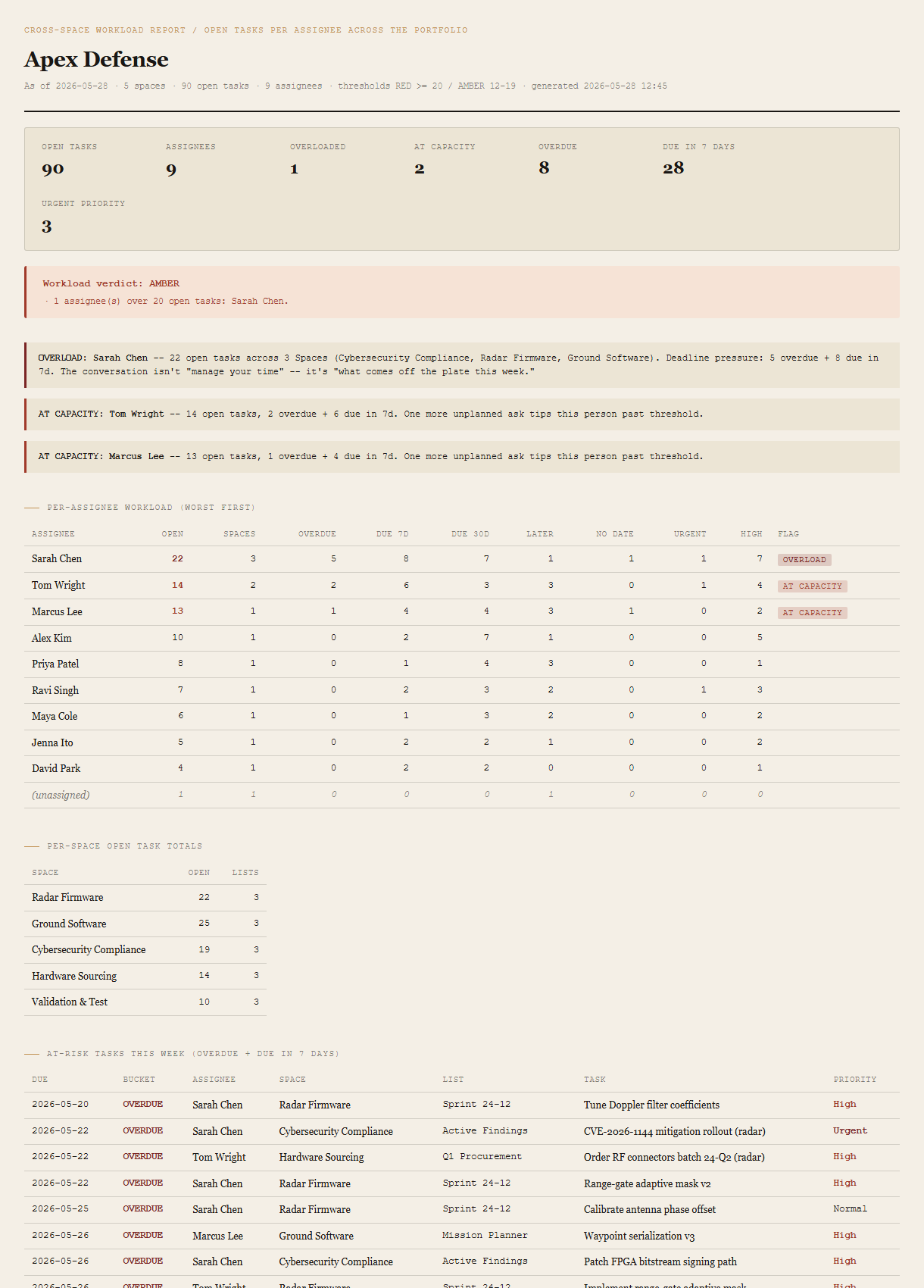
Summary + verdict
Open tasks, assignees, overloaded count, at-capacity count, deadline-pressure totals (overdue + due-7d), urgent-priority count. The verdict block beneath shows GREEN / AMBER / RED with the specific thresholds that triggered it.
Overload + at-capacity callouts
For each overloaded assignee, an inline callout names the Spaces they span, their deadline pressure, and the implied conversation ("what comes off the plate this week"). At-capacity callouts get a softer treatment with the same data shape.
Per-assignee workload table (worst-first)
One row per assignee. Open-task count, Space-span count, deadline buckets (overdue / due-7d / due-30d / later / no date), priority counts (Urgent / High), chronic flag. Sorted overload-first, then at-capacity, then by total descending.
Per-Space open task totals
Small reconciliation table so the per-assignee math ties out to per-Space totals. The cross-check Portfolio Rollup users will want.
At-risk task list (this week)
Every task that's overdue or due in the next 7 days, sorted most-overdue first. Due date, bucket, assignee, Space, List, task name, priority. The Monday-morning artifact — PMO scans down this list, names the calls to make today.
Requirements
- OSWindows, macOS, or Linux
- RuntimePowerShell 7+ (
pwsh). 5.1 is not supported. - BrowserAnything modern. UI on
localhost:8783. - ClickUpLive mode deferred to v2 — reuses the Portfolio Rollup auth flow (Personal API Token via env var or
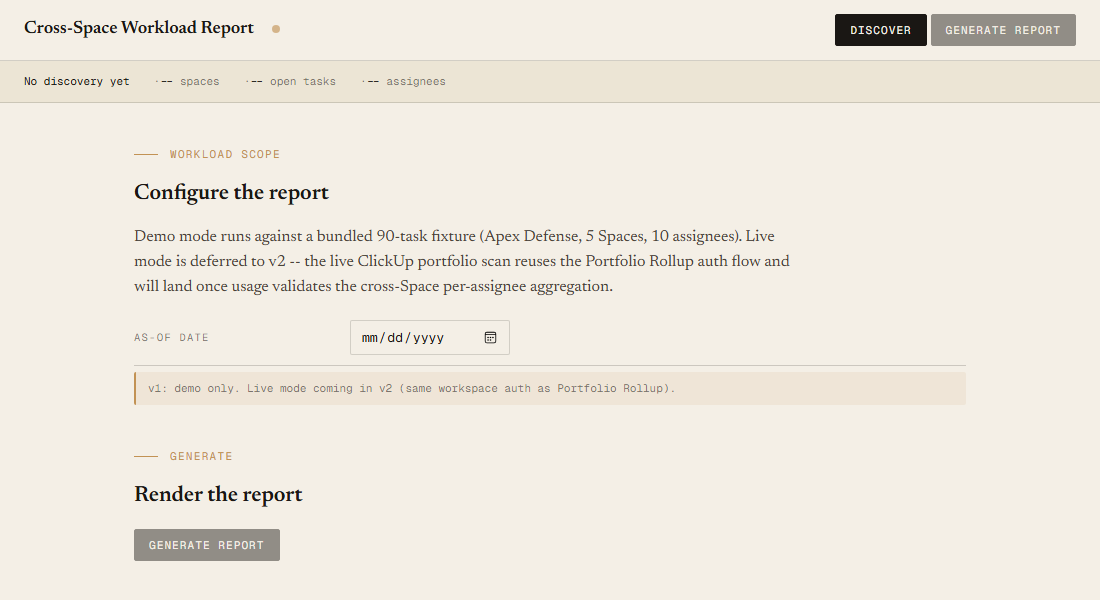
~/.clickup-token). v1 demonstrates the report shape on a bundled fixture. - Demo modeBundled 90-task / 5-Space / 10-assignee Apex Defense fixture — runs end-to-end with no creds.
- ThresholdsTunable via
-OverloadThresholdand-AtCapacityThresholdongenerate.ps1(defaults: 20 / 12).
Claude could write this. Two reasons to prefer the script.
Some workplaces — defense, medical devices, finance, anywhere with a strict IT policy — won't let Claude or any AI tool touch production data. These tools run on your machine, with no Claude or AI in the data path. Vendor data (in this case, your ClickUp workspace) flows direct from your machine to api.clickup.com and back — no third-party SaaS in between, no telemetry, no tokens leaving your environment. And even where AI is allowed, repeat workflows shouldn't cost tokens — a deterministic script runs the same way every time, for free, forever. The prompt guide below shows how this tool was built with Claude; the download is what you run after.
Three files. Free.
The tool, a user guide, and a prompt guide showing the spec, the workload thresholds, the verdict heuristics, and the Pester contract that pins the demo fixture's per-assignee counts.
Drop your email to unlock the downloads.
One email when new tools ship, digest only. Confirms via Kit (double opt-in). No tracking. Unlocks every download on the site from this browser.
./start.ps1.