Portfolio Hygiene Audit
The cross-Space rollup is the deliverable. The hygiene audit is the predicate. If half the tasks have no assignee, no due date, or are missing required custom fields, the rollup is lying. This tool walks every Space in the workspace, names the missing data per Space, surfaces status-name duplication across Spaces, and ranks the assignees responsible for the most cleanup. One page, GREEN/AMBER/RED verdict, regulated-industry framing.
Cross-Space dashboards are gated. So is the hygiene that makes them honest.
"In Progress" and "In progress" are two columns.
ClickUp's statuses are defined per-Space. Different teams converge on different conventions: one Space uses "In Progress," another uses "In progress" (lowercase), a third uses "WIP," a fourth uses "Working." All four mean the same thing. None of them match. The cross-Space rollup splits the same semantic state into four buckets and shows you a lie. This audit names every variant and tells you which Spaces it lives in.
The Space template defines Risk Owner. The tasks don't have one.
In regulated portfolios, fields like Risk Owner, Compliance Tag, Cost Code, Target Release matter for traceability. ClickUp supports custom fields. ClickUp doesn't enforce that a task fills them in. So six months in, you have a Space where 40% of tasks have a blank Risk Owner field and the quarterly compliance pull pretends those tasks don't exist. This audit reports coverage per required field per Space, worst-first.
Hygiene volume is one signal. Hygiene concentration is another.
A portfolio where ten engineers each have two hygiene problems is a process gap. A portfolio where one engineer has twenty is a different conversation. This audit ranks assignees by problem count so the PMO knows whether to fix the template or have the one-on-one.
This tool addresses all three: one local PowerShell script that reads a workspace's portfolio shape, computes per-Space hygiene rates, detects status-name duplication via case-insensitive grouping plus a curated semantic-synonym list, and renders the result as a single self-contained HTML file with a GREEN/AMBER/RED verdict at the top.
One page. Six sections. Verdict at the top.
The output is a single self-contained HTML file written to ./output/.
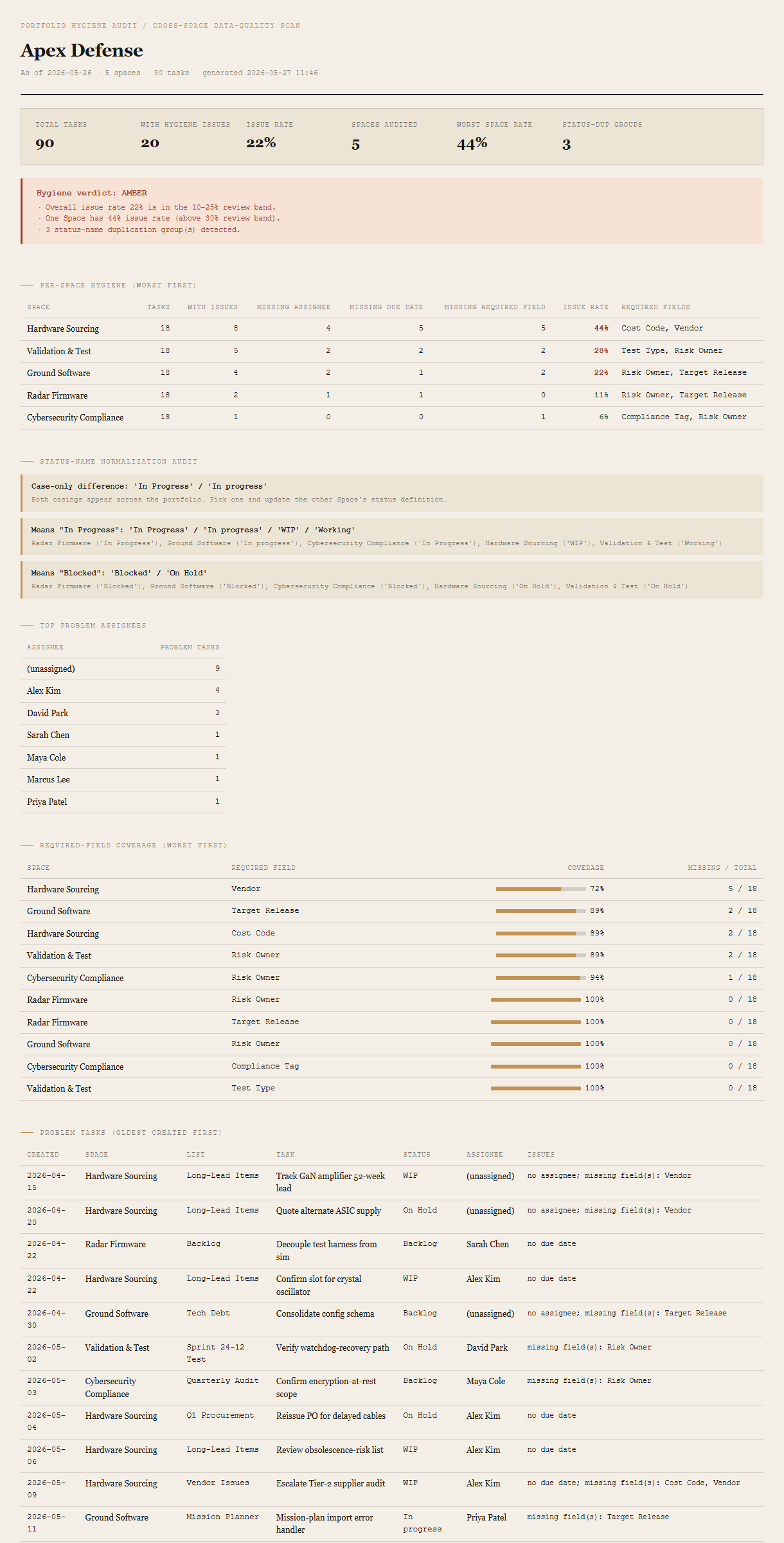
Summary + verdict
Total tasks, total with hygiene issues, overall issue rate, worst Space rate, status-dup-group count. The verdict block beneath shows GREEN / AMBER / RED with the specific thresholds that triggered it.
Per-Space hygiene (worst-first)
One row per Space: total tasks, tasks with issues, missing-assignee count, missing-due-date count, missing-required-field count, issue rate %, and the Space's required-field list. Issue rate color-coded green / amber / red so RED Spaces draw the eye first.
Status-name normalization audit
Two pass detection. Case-only: "In Progress" vs "In progress." Semantic synonyms: "In Progress" / "WIP" / "Working" all meaning the same thing across different Spaces. Each detection block names the variants, the Spaces they appear in, and the canonical version to converge on.
Top problem assignees
The assignees responsible for the most hygiene problems. Includes an explicit (unassigned) bucket so the "no owner" volume is visible as its own row.
Required-field coverage
One row per (Space, required field) pair: coverage % with a small bar, missing-count over total. Sorted by coverage ascending so the worst gaps surface first.
Chronological problem list
Every problem task, oldest first. Created date, Space, List, task name, status, assignee, and the comma-separated list of issues. The artifact for the cleanup sprint.
Requirements
- OSWindows, macOS, or Linux
- RuntimePowerShell 7+ (
pwsh). 5.1 is not supported. - BrowserAnything modern. UI on
localhost:8781. - ClickUpLive mode deferred to v2 — reuses the Portfolio Rollup auth flow (Personal API Token, env var or
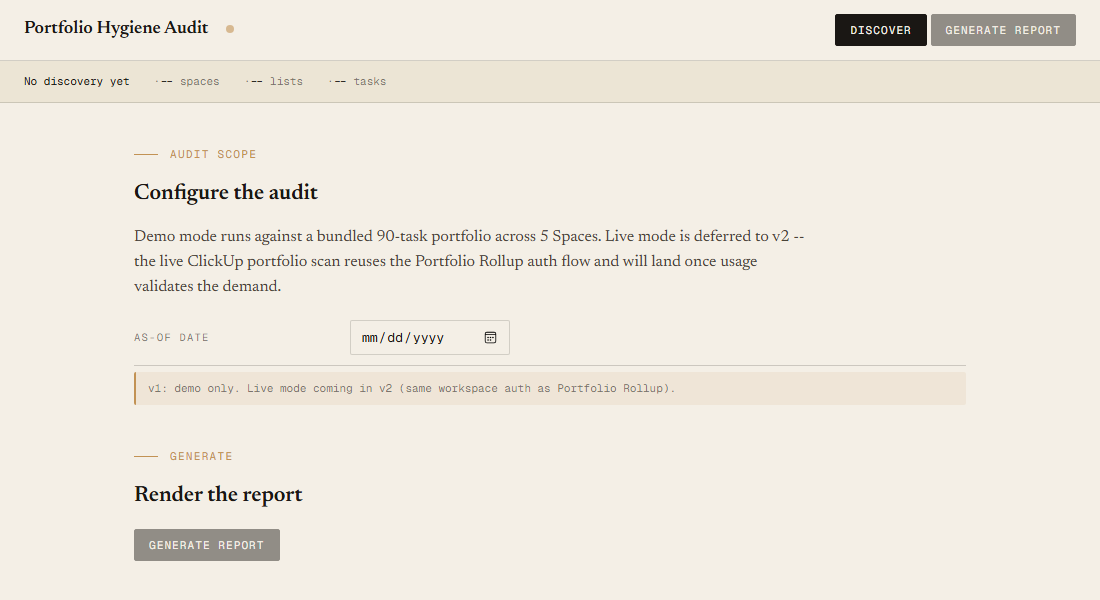
~/.clickup-token). v1 demonstrates the report shape on a bundled fixture. - Demo modeBundled 90-task / 5-Space / 15-List Apex Defense fixture — runs end-to-end with no creds.
Claude could write this. Two reasons to prefer the script.
Some workplaces — defense, medical devices, finance, anywhere with a strict IT policy — won't let Claude or any AI tool touch production data. These tools run on your machine, with no Claude or AI in the data path. Vendor data (in this case, your ClickUp workspace) flows direct from your machine to api.clickup.com and back — no third-party SaaS in between, no telemetry, no tokens leaving your environment. And even where AI is allowed, repeat workflows shouldn't cost tokens — a deterministic script runs the same way every time, for free, forever. The prompt guide below shows how this tool was built with Claude; the download is what you run after.
Three files. Free.
The tool, a user guide, and a prompt guide showing the spec, the verdict heuristics, the synonym-list design, and the Pester contract that pins the demo fixture's hygiene counts.
Drop your email to unlock the downloads.
One email when new tools ship, digest only. Confirms via Kit (double opt-in). No tracking. Unlocks every download on the site from this browser.
./start.ps1.