Excel Plan Validator
Tracker Doctor audits the spreadsheet at the formula level — broken references, inconsistent types, drift in the structure. This one audits the spreadsheet at the content level. Point it at your project plan, get back the eight things Excel will never tell you on its own: end dates that precede start dates, parent tasks that finish before their children, milestones with duration, duplicate IDs, orphaned predecessors, missing dates, items overdue and still at 0%, and rows marked 100% complete whose predecessors aren't. Pre-baseline gate check for PMs whose only planning tool is Excel.
A project plan in Excel is internally consistent only by accident.
End-before-start, parent-before-child, milestones with duration — none of them get flagged.
Excel will happily accept a task whose End date is earlier than its Start, a parent summary task whose End is earlier than the children rolling up into it, and a row tagged Milestone=Yes that nevertheless spans nineteen days. There's no structural sanity check in Excel for any of it. The plan ships internally inconsistent and the PM doesn't know — because the cells all hold valid dates and the sheet doesn't compare them to each other.
The error doesn't reveal itself in Excel — it reveals itself later, downstream, when somebody else catches it: at steering committee, during baseline sign-off, when a Gantt screenshot lands in a slide and the dates don't add up. By the time it surfaces, the broken assumption has been the source of truth for weeks.
By the time anyone notices, the plan has been the source of truth for two months.
The pattern is the same every time: plan gets baselined in March, used for two months of status reporting, and then in May at a steering committee the sponsor asks why milestone M-4 has a fifteen-day duration when it's supposed to be instantaneous. The PM looks. The PM realises M-4 has been wrong since day one and every burn-up chart for the last sixty days inherited it. Pre-baseline validation would have caught the error in the thirty seconds before sign-off; post-baseline it costs a re-publish, a re-explanation, and a small amount of credibility.
The plan is the upstream artifact. Everything else is a screenshot of it.
A duplicate task ID, a predecessor that points to a row that no longer exists, a missing date cell — each of these silently invalidates every Gantt screenshot, every status doc, every milestone report that was derived from the plan. The downstream artifacts don't know they're built on broken inputs. The validator catches the structural breakage at the source so the downstream views can be trusted.
This tool addresses all three: one local PowerShell script that reads an .xlsx project plan, checks it against eight structural integrity rules, and produces a single-page report with a GREEN/AMBER/RED verdict the PM can run before baseline sign-off — or before every steering committee thereafter.
One page. Verdict + 8 per-category cards + tasks-with-issues table.
The output is a single self-contained HTML file written to ./output/. System fonts, no external CSS or JS, prints cleanly, embeds in email.
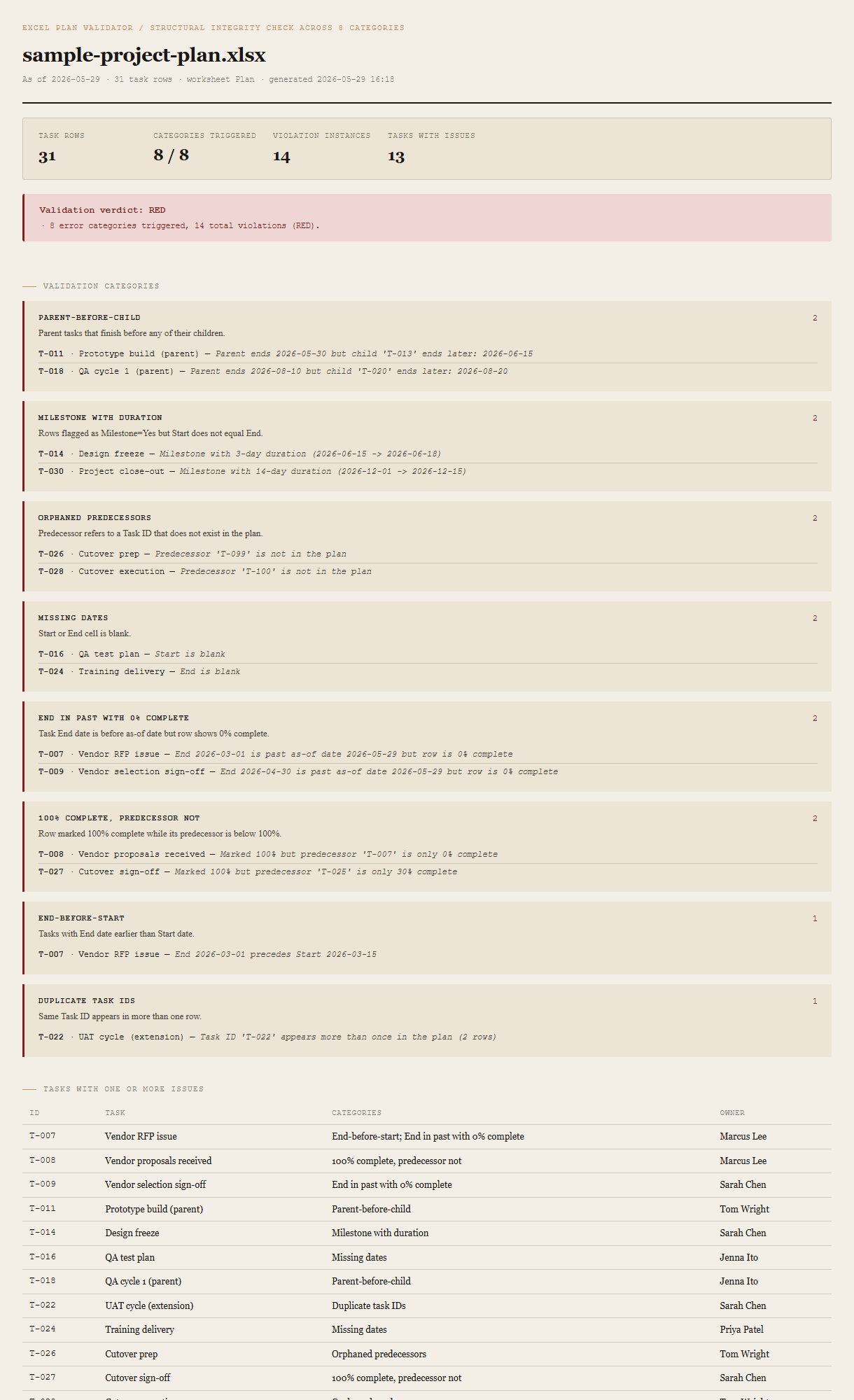
Summary + verdict
Task rows, categories triggered (out of 8), total violation instances, tasks with at least one issue. The verdict block beneath shows GREEN / AMBER / RED with the specific reasons that triggered it — named in plain language, not just a color.
Per-category cards (failing first)
Eight cards, one per validation rule. Failing categories sort to the top with a red border; clean categories sit at the bottom with a green border. Each failing card lists every violating row with its Task ID, name, and a specific detail line (e.g. "End 2026-03-10 precedes Start 2026-03-15"). The PM reads the failing cards top-down and knows exactly which cells to fix.
Tasks-with-issues table
One row per task that triggered at least one category, with the list of categories it triggered. A task that fires on three rules shows up once with three categories listed — not three times in three different tables. The PM can scan this table and see which rows in the source plan have the most concentrated structural problems.
Requirements
- OSWindows, macOS, or Linux
- RuntimePowerShell 7+ (
pwsh). 5.1 is not supported. - Module
ImportExcel— install once withInstall-Module ImportExcel -Scope CurrentUser. No Office, no Excel install needed on the machine running the tool. - BrowserAnything modern. UI on
localhost:8787. - InputAn
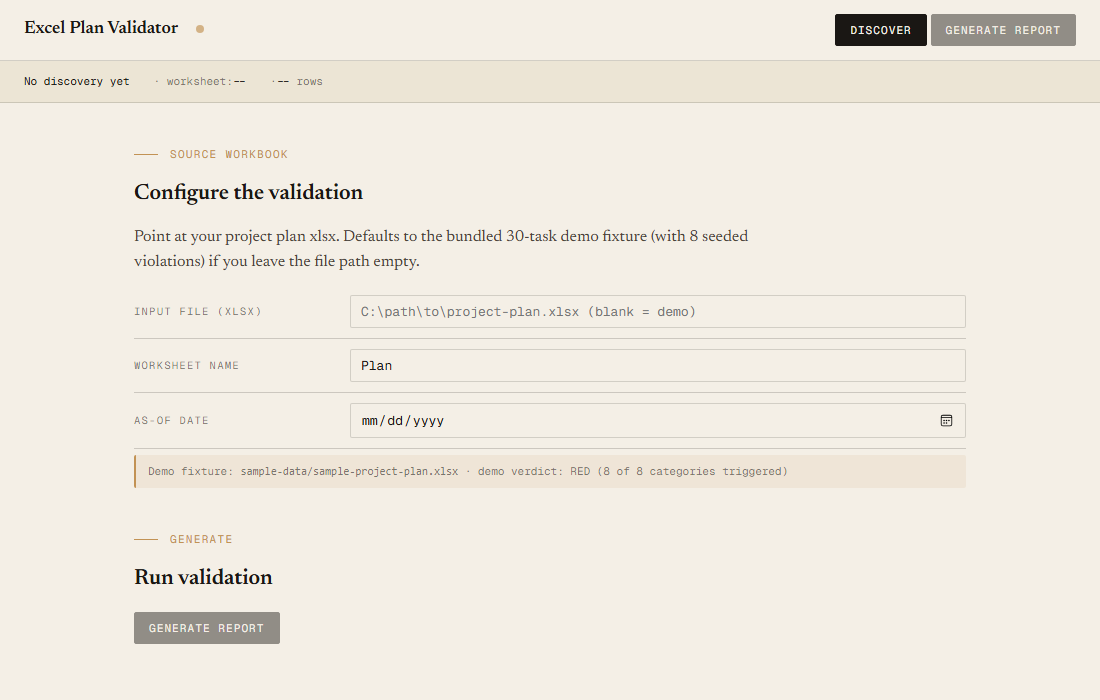
.xlsxproject plan with at minimumID,Task,Start,Endcolumns.Owner,Percent Complete,Milestone,Predecessor,Parentare optional but unlock more validations. Common aliases are accepted (see user guide). - Demo modeBundled 31-row project-plan fixture — runs end-to-end with no input file, produces a RED verdict against deliberately seeded violations in all 8 categories.
Claude could write this. Two reasons to prefer the script.
Some workplaces — defense, medical devices, finance, anywhere with a strict IT policy — won't let Claude or any AI tool touch production data. These tools run on your machine, with no Claude or AI in the data path. The file-based ones — this tool included — make no network calls at all: your project plan is read from local disk, the report is written to local disk, nothing leaves the machine. And even where AI is allowed, repeat workflows shouldn't cost tokens — a deterministic script runs the same way every time, for free, forever. The prompt guide below shows how this tool was built with Claude; the download is what you run after.
Three files. Free.
The tool, a user guide, and a prompt guide showing the spec, the 8 validation rules, the verdict thresholds, the fixture's per-category counts, and the Pester contract that pins them.
Drop your email to unlock the downloads.
One email when new tools ship, digest only. Confirms via Kit (double opt-in). No tracking. Unlocks every download on the site from this browser.
./start.ps1.