Plan vs Actual Variance Report
Excel Plan Validator is the pre-baseline gate — run it once before sign-off to make sure the plan is internally coherent. This one is the cycle-by-cycle variance report that every steering committee then asks for: point it at the same .xlsx with a Baseline End column and a Forecast (or Actual) End column, and get back per-task slip in working days, five severity buckets, a project-level finish-slip number, and a GREEN / AMBER / RED verdict. The variance report MSP gives you for free; rebuilt for the Excel-only PM with no MSP needed.
Two columns of dates and no math between them.
Baseline End and Forecast End sit next to each other, and the spreadsheet never tells you the per-task slip.
The PM eyeballs the two columns row by row, mentally subtracts, and tries to remember which differences are worth flagging. The steering committee asks for project-level drift and gets a hand-counted answer with the unspoken caveat that the PM ran through it twice and is reasonably sure. There's no per-task variance column, no bucket distribution, no project-finish-slip calculation — just two dates and a human doing arithmetic.
Without bucketing by severity, the report says "things are slipping" without the actionable detail.
A row that's three days late and a row that's thirty-five days late are visually identical when the report is just a column of variance numbers. The PM has to scan the whole list, categorize in their head, and present a triaged summary — every cycle, from scratch. Bucketing by working-day severity (Ahead, On Track, Slipped, At Risk, Critical) does the triage once, deterministically, and the same way every week.
Leadership wants one number: how much later does the project finish than the plan said it would?
Computing it manually from a 25-to-100-row plan means scanning every Forecast End cell to find the latest one, scanning every Baseline End cell to find the latest one, subtracting in working days, and reporting the result. Tedious in a quiet week and easy to get wrong; the mistakes silently change the headline number the sponsor remembers from the deck. The tool computes both maxima and the working-day delta, every time, in the same place on the page.
This tool addresses all three: one local PowerShell script that reads an .xlsx with Baseline and Forecast (or Actual) End columns, computes per-task variance in working days, buckets every task by severity, calculates the project-level finish slip, and produces a single-page report with a GREEN/AMBER/RED verdict the PM can run before every status meeting — same input as Excel Plan Validator, different report.
One page. Bucket distribution + verdict + Critical-first task tables + per-owner aggregate.
The output is a single self-contained HTML file written to ./output/. System fonts, no external CSS or JS, prints cleanly, embeds in email.
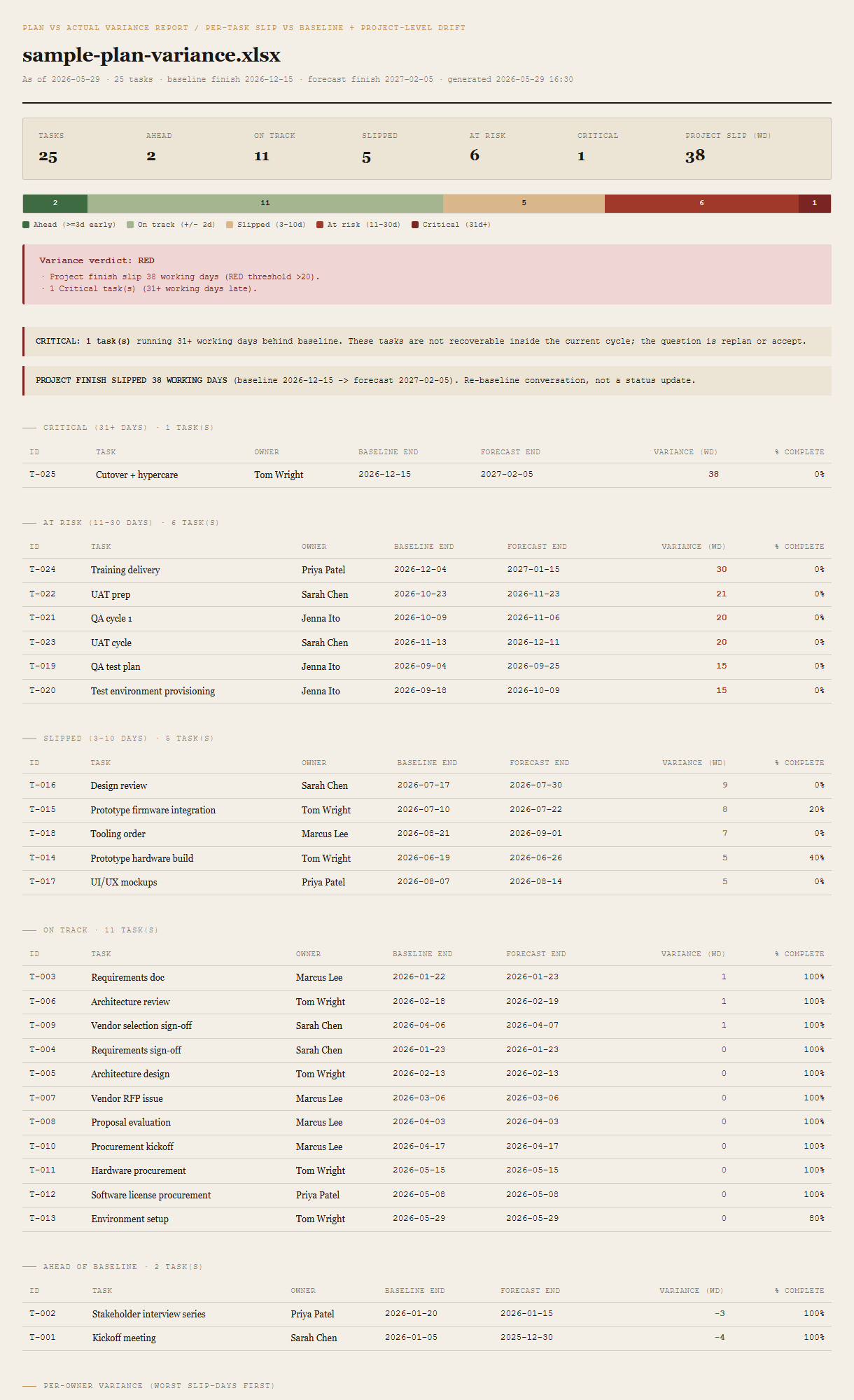
Summary row + bucket-bar viz
Seven cells across the top: tasks, the five bucket counts, project slip in working days. Beneath, a single horizontal bar shows the proportional distribution across the five buckets — one glance tells you whether the plan is mostly green with a Critical outlier or mostly red with no green left. The bar is the fastest read on the page.
Verdict + Critical and project-slip callouts
GREEN / AMBER / RED in a colored block, followed by a bulleted list of the specific reasons it triggered — named in plain language (e.g. "Project finish slip 38 working days (RED threshold >20)"), not just a color. If any tasks are Critical, a CRITICAL callout sits beneath the verdict. If the project finish slips more than 20 working days, a PROJECT FINISH SLIPPED callout sits next to it — the explicit reframe that this is a re-baseline conversation, not a status update.
Per-bucket task tables (Critical first)
Five tables, one per bucket, Critical first then At Risk, Slipped, On Track, Ahead. Each table shows ID, Task, Owner, Baseline End, Forecast End, variance (working days), percent complete. Sorted within each bucket by variance, worst slip at the top. The PM reads top-down and works through the actionable rows in order of severity; the On Track and Ahead tables sit at the bottom as visual reassurance.
Per-owner aggregate
One row per Owner, ranked by total slip-days across all their tasks (worst first). Columns: total tasks, Critical count, At Risk count, total slip-days. The triage table for the per-owner conversations after the meeting — whose plate is breaking, and how.
Requirements
- OSWindows, macOS, or Linux
- RuntimePowerShell 7+ (
pwsh). 5.1 is not supported. - Module
ImportExcel— install once withInstall-Module ImportExcel -Scope CurrentUser. No Office, no Excel install needed on the machine running the tool. - BrowserAnything modern. UI on
localhost:8788. - InputAn
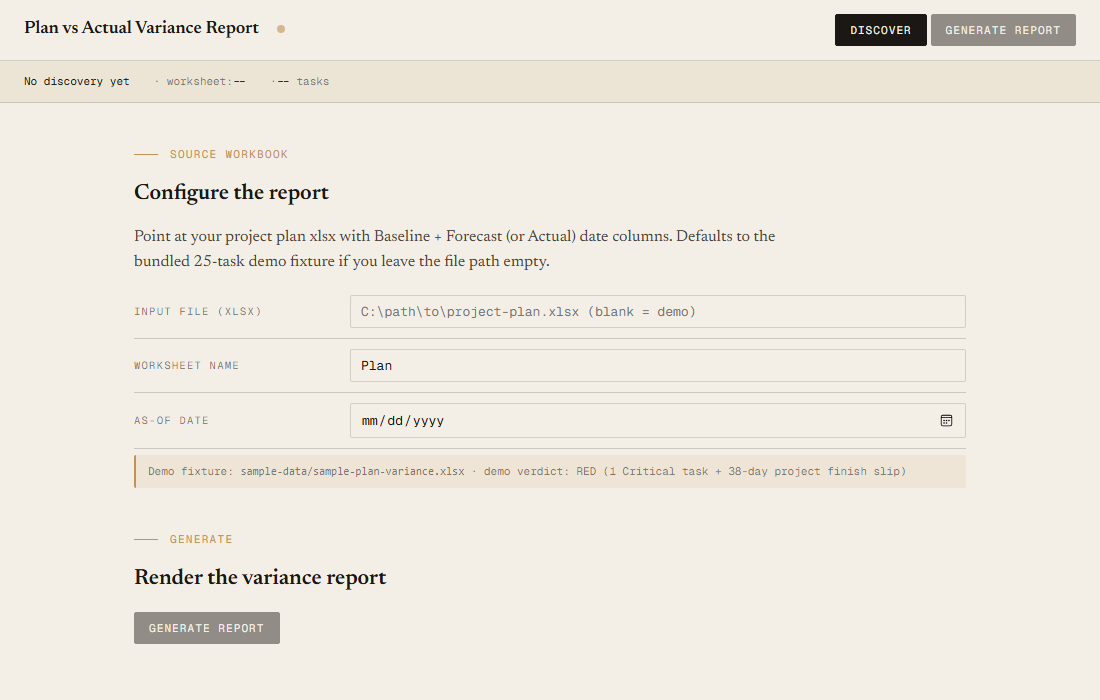
.xlsxproject plan with at minimumID,Task,Baseline End,Forecast Endcolumns.Owner,Baseline Start,Forecast Start,Percent Completeare optional. Common aliases are accepted (see user guide). - Demo modeBundled 25-task project-plan fixture — runs end-to-end with no input file, produces a RED verdict driven by a 38-working-day project finish slip.
Claude could write this. Two reasons to prefer the script.
Some workplaces — defense, medical devices, finance, anywhere with a strict IT policy — won't let Claude or any AI tool touch production data. These tools run on your machine, with no Claude or AI in the data path. The file-based ones — this tool included — make no network calls at all: your project plan is read from local disk, the report is written to local disk, nothing leaves the machine. And even where AI is allowed, repeat workflows shouldn't cost tokens — a deterministic script runs the same way every time, for free, forever. The prompt guide below shows how this tool was built with Claude; the download is what you run after.
Three files. Free.
The tool, a user guide, and a prompt guide showing the spec, the five variance buckets with working-day cutoffs, the project-finish-slip math, the verdict thresholds, the fixture's pinned bucket distribution, and the Pester contract that holds them in place.
Drop your email to unlock the downloads.
One email when new tools ship, digest only. Confirms via Kit (double opt-in). No tracking. Unlocks every download on the site from this browser.
./start.ps1.