Risk Register Decay Audit
The Action Item Aging Report's sibling. Same architecture, different artifact — point it at your risk register xlsx, get back the audit view every PM rebuilds before every steering committee. Active risks bucketed by tier (High / Medium / Low), staleness checked against priority-tiered review cadence (High >7d, Medium >14d, Low >30d), unowned and no-mitigation risks flagged separately, per-owner aggregate, and a GREEN/AMBER/RED hygiene verdict against named thresholds.
A risk register in Excel is a compliance artifact pretending to be a management tool.
It's written once, reviewed twice, and never updated again.
Every project starts with a risk workshop. Twelve to thirty risks get logged with neat probability and impact scores, an owner column gets populated, and a mitigation plan is written in three sentences per row. Then the project starts, and the register doesn't get opened again until the auditor or sponsor asks for it — at which point the dates are months old, the owners have rotated off, and the mitigations describe a plan that never happened. The register exists to be shown, not to be used.
"Most Excel-based risk registers are updated once at project kick-off and rarely revisited — the register becomes a compliance artifact rather than a live management tool." Arcturus Pro · "Excel vs Project Management Software" (arcturuspro.com)
Without a Last Reviewed date, you cannot tell whether a risk has been considered recently.
An unchanged row is ambiguous. It might mean the owner looked at the risk this week, decided nothing had moved, and consciously left it alone — the system working as intended. Or it might mean nobody has touched the row since kickoff and the risk has quietly evolved into something different. The sheet looks the same in both cases. Without a Last Reviewed column and a discipline of bumping it on every review, the register can't distinguish "still true" from "still there." The audit answer is the same: it failed.
A High-priority risk reviewed 20 days ago is stale. A Low-priority risk reviewed 20 days ago is fine.
The common reflex is to set one staleness threshold and apply it to every risk equally — "anything not reviewed in 30 days is stale." That threshold either oversensitively flags every Low risk in a long project, or undersensitively misses a High risk that needed weekly attention and got monthly attention instead. The cadence rule has to be priority-tiered: High weekly, Medium biweekly, Low monthly. One threshold across all tiers rots either way.
This tool addresses all three: one local PowerShell script that reads an .xlsx risk register, computes each risk's age against the threshold for its tier, raises three independent flags (stale, unowned, no-mitigation), and produces a single-page report with a verdict the PM can hand to a sponsor or auditor without an extra meeting.
One page. Verdict + three callouts + stale-detail table + active register + per-owner aggregate.
The output is a single self-contained HTML file written to ./output/. System fonts, no external CSS or JS, prints cleanly, embeds in email or a steering deck.
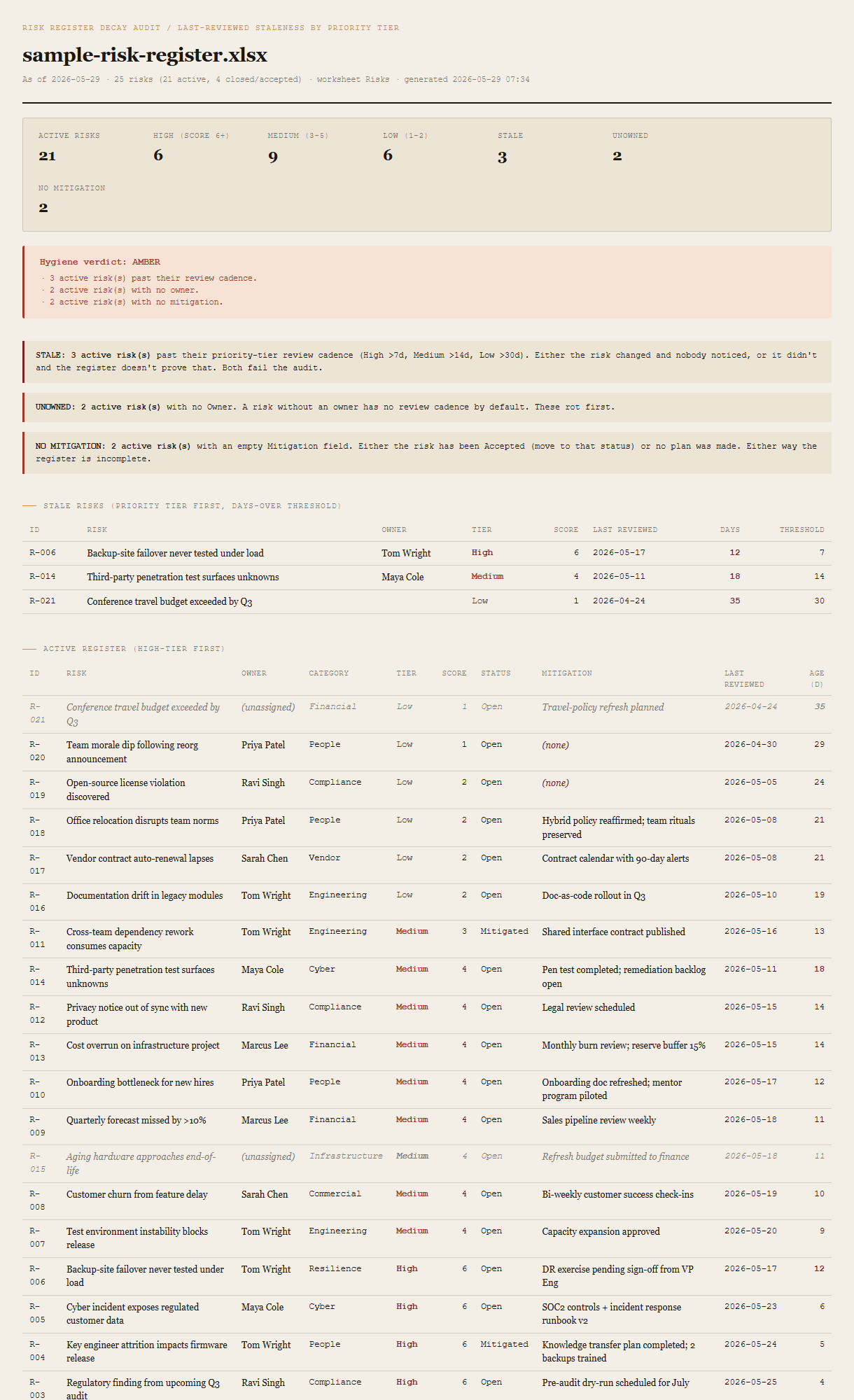
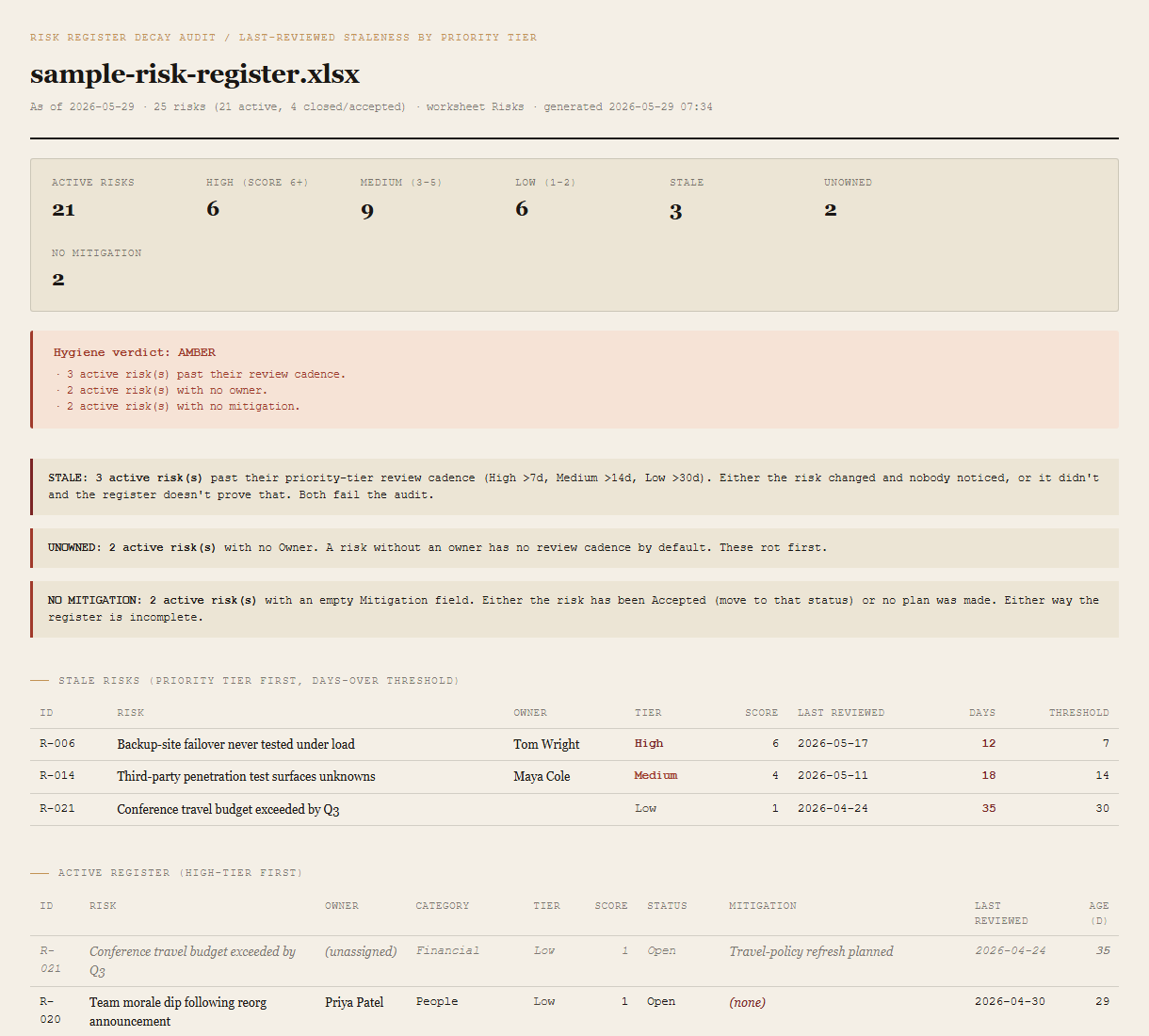
Summary + verdict
Active risks, per-tier counts (High score 6+ / Medium 3-5 / Low 1-2), stale count, unowned count, no-mitigation count. The verdict block beneath shows GREEN / AMBER / RED with the specific thresholds that triggered it — named in plain language, not just a color.
Three hygiene callouts
One callout per triggered flag: STALE (past tier-specific review threshold), UNOWNED (empty Owner), NO MITIGATION (empty Mitigation). Kept as three separate callouts deliberately — a combined "register health score" would obscure which conversation needs to happen.
Stale risks detail (highest tier first)
One table, sorted by tier (High before Medium before Low), then by days-over-threshold descending within each tier. Each row: ID, Risk, Owner, Tier, Score, Last Reviewed, Days, Threshold. The worst breach in the highest tier is the first row on the page.
Active register (high-tier first)
The full audited register. One row per active risk, sorted by tier then score then age. Stale ages and unassigned owners are visually flagged. Empty Mitigation cells render in red (none) so the rot is visible without re-running the report.
Per-owner aggregate (stale-first)
One row per owner. Active count, of which stale. Sorted by stale count descending, then total. The (unassigned) row appears in italic muted styling at its appropriate position. The owner with the most stale risks is the first conversation.
Inactive summary
A small strip noting how many risks are marked Closed, Accepted, Transferred, Avoided, or Retired. Not included in verdict math — an Accepted risk is a real decision, not a hygiene failure — but shown so the active/inactive ratio is visible.
Requirements
- OSWindows, macOS, or Linux
- RuntimePowerShell 7+ (
pwsh). 5.1 is not supported. - Module
ImportExcel— install once withInstall-Module ImportExcel -Scope CurrentUser. No Office, no Excel install needed on the machine running the tool. - BrowserAnything modern. UI on
localhost:8786. - InputAn
.xlsxrisk register with at minimumID,Risk,Status,Last Reviewedcolumns.Owner,Category,Probability,Impact,Score,Mitigation,Createdare optional but improve the report. IfScoreis missing it's computed fromProbability x Impact. Common aliases are accepted (see user guide). - Demo modeBundled 25-risk fixture — runs end-to-end with no input file, produces an AMBER verdict against deliberately seeded stale, unowned, and no-mitigation risks.
Claude could write this. Two reasons to prefer the script.
Some workplaces — defense, medical devices, finance, anywhere with a strict IT policy — won't let Claude or any AI tool touch production data. These tools run on your machine, with no Claude or AI in the data path. The file-based ones — this tool included — make no network calls at all: your risk register is read from local disk, the report is written to local disk, nothing leaves the machine. And even where AI is allowed, repeat workflows shouldn't cost tokens — a deterministic script runs the same way every time, for free, forever. The prompt guide below shows how this tool was built with Claude; the download is what you run after.
Three files. Free.
The tool, a user guide, and a prompt guide showing the spec, the priority-tiered staleness rules, the active-vs-inactive status semantics, the verdict logic, and the Pester contract that pins the demo fixture's per-tier and per-owner counts.
Drop your email to unlock the downloads.
One email when new tools ship, digest only. Confirms via Kit (double opt-in). No tracking. Unlocks every download on the site from this browser.
./start.ps1.