Milestone Status Report
Read your Microsoft Project XML, classify every milestone by status (complete, in progress, late, at risk, upcoming), and get a single self-contained HTML page your steering committee can open without a license — baseline-compared, sorted headlines-first, no PDF flattening.
Project ships a milestone filter. Not a status report.
"Milestone = Yes" is a filter, not a status doc.
Project's Milestone filter hides non-milestone rows but the output is still the standard task table — baseline columns sit beside current columns, % complete is one cell, status is implied by reading. To make an executive-ready status doc, the PM has to configure custom bar styles per status, export to PDF, and lose the underlying data.
"Out of the box Microsoft Project views are limiting and don't provide the visual summary level views that give an executive the quick overview of project or program health he or she needs for making quick and accurate business decisions." Chris Mauck · MPUG, Creating Milestone Reports in Microsoft Project
Project shows variance. It doesn't classify status.
A milestone past its baseline date and not complete is late — the action is escalation. A milestone whose forecast finish has slipped 15 working days past baseline but isn't yet due is at risk — the action is mitigation. A milestone currently in progress at 60% is in progress — the action is updating actuals. Project shows all three as cells in a table; the PM classifies by reading. Every reporting cycle.
"Send me the milestone slide" means flatten and lose the data.
Even when the PM has the right Project view configured, the deliverable for the steering committee, customer program office, or contract gate review is a PDF screenshot. The drill-down to "which task triggered the slip, when did it first appear in the forecast, what's the predecessor count" is lost the moment the image is exported.
This tool addresses all three: a deterministic local script that reads the Project XML, classifies every milestone by status against Baseline 0, and produces a single self-contained HTML artifact a customer can read — with variance, percent complete, and predecessor count inline.
One page, milestones grouped by status, headlines first.
The output is a single self-contained HTML file written to ./output/. System fonts, no external CSS or JS, prints cleanly, embeds in email. Five sections; the order is deliberate so the broken items surface first.
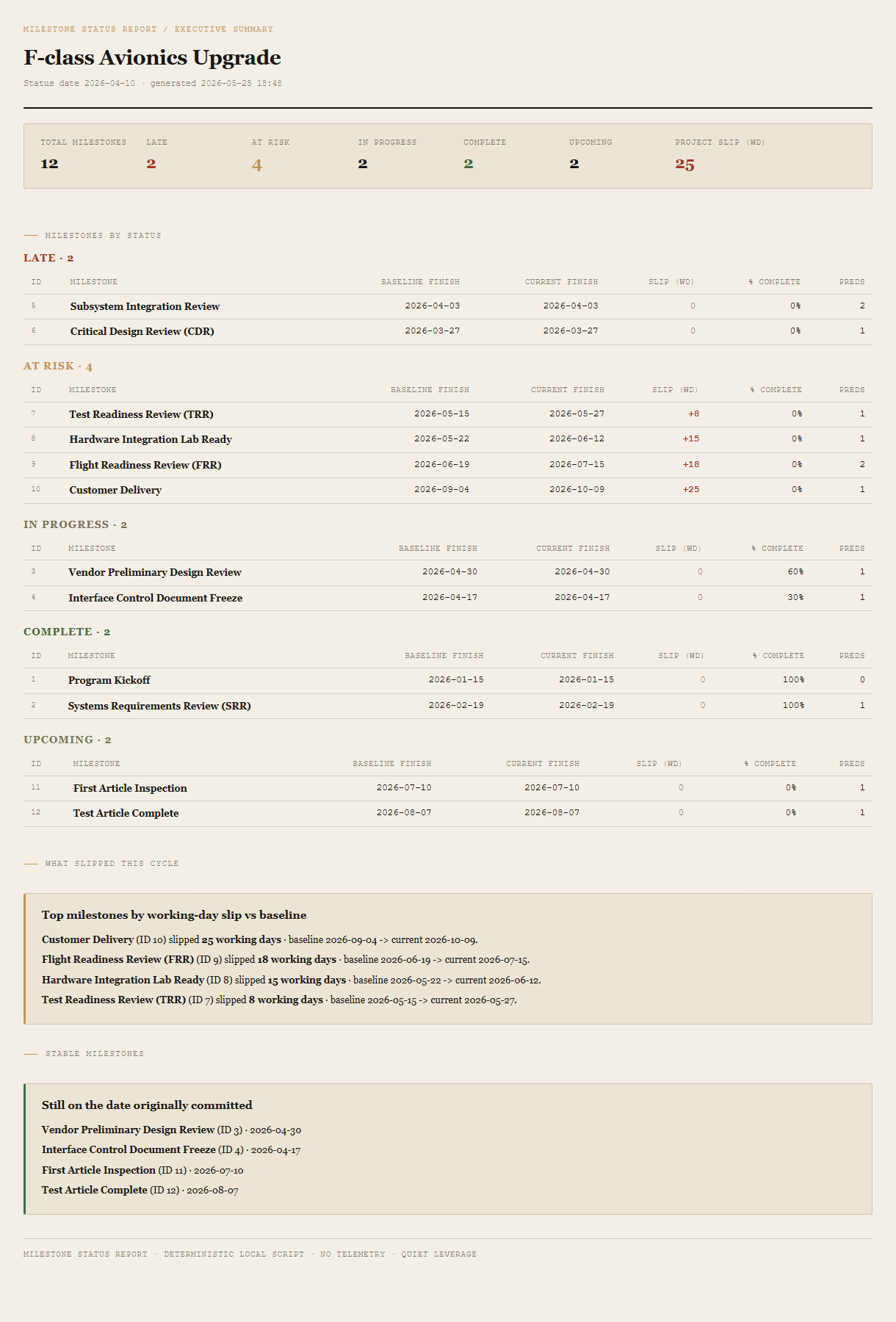
Summary header
Total milestones, count per status (Late / At risk / In progress / Complete / Upcoming), and the project-level slip in working days (Baseline 0 vs current forecast). The headline number is in red ochre if positive.
Milestones grouped by status
Late first, then At risk, then In progress, then Complete, then Upcoming. Each section is a table: ID, milestone name, baseline finish, current finish, slip in working days (signed), percent complete, predecessor count.
What slipped this cycle
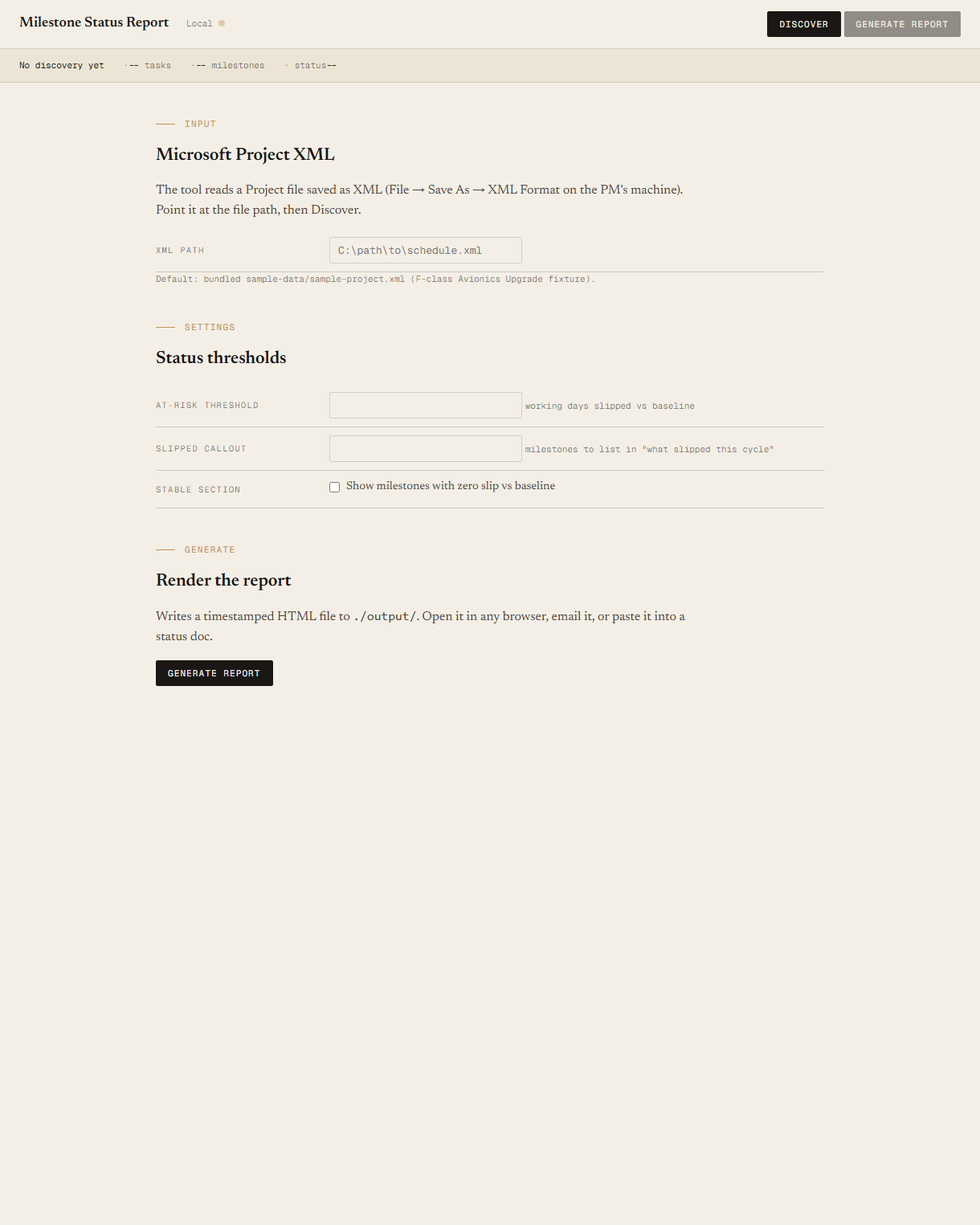
Top N milestones by working-day slip vs Baseline 0. One-line callout per milestone: name, working days slipped, baseline date → current date. Default N=5; override in the local UI.
Stable milestones
The credibility section. Milestones whose current finish equals their baseline finish, and that aren't late or complete. These are still on the date originally committed. Listed by ID and name. The section the customer reads first.
Requirements
- OSWindows, macOS, or Linux
- RuntimePowerShell 7+ (
pwsh). Windows PowerShell 5.1 is not supported. - BrowserAnything modern. Configuration UI is on
localhost:8774. - MS ProjectRequired only on the PM's machine, to do a one-time File → Save As → XML Format. The reading machine never touches Project.
- NetworkNone. The tool reads a local file and writes a local file.
- DataNever leaves your machine. Schedule data sits on disk; HTML is generated locally; you decide who gets the file.
Claude could write this. Two reasons to prefer the script.
Some workplaces — defense, medical devices, finance, anywhere with a strict IT policy — won't let Claude or any AI tool touch production data. These tools run locally with no network calls. And even where AI is allowed, repeat workflows shouldn't cost tokens — a deterministic script runs the same way every time, for free, forever. The prompt guide below shows how this tool was built with Claude; the download is what you run after.
Three files. Free.
The tool itself, a user guide that walks through the one-time XML export and the Discover/Generate loop, and a prompt guide showing how this was built with Claude Code — the spec, the seeded fixture, the Pester contract that pins each status bucket's count.
Drop your email to unlock the downloads.
One email when new tools ship, digest only. Confirms via Kit (double opt-in). No tracking. Unlocks every download on the site from this browser.
./start.ps1.