Schedule Audit
Run the DCMA 14-Point Schedule Assessment against your Microsoft Project file and get a one-page report your customer can read — pass/fail per metric, the offending tasks listed inline, no $thousands-per-seat tool, no cloud upload, no Project license required on the reading machine.
Schedule audits are a closed-shop economy.
Project ships the inputs. It does not ship the audit.
Microsoft Project surfaces the fields the DCMA assessment needs — TotalSlack, ConstraintType, predecessor links, baseline data — but won't tell you "your Logic score is 87.6%, here are the 6 offending tasks." The standard path is a commercial tool: Acumen Fuse, Steelray Project Analyzer, Schedule Inspector. Each runs four figures per seat, requires installation on the PM's machine, and produces dashboards the PM then has to flatten to PDF to share. Smaller contractors and one-PM shops either skip the audit and find out at submission, or run a homegrown VBA macro that they don't trust.
"If you have tasks without predecessors, check the plan logic by asking: What is preventing this task happening today? If a task has no predecessors then in theory there is nothing in the logic of the plan to prevent it happening right now." Stakeholder Map · Top 10 MS Project Scheduling Mistakes
The dashboards lock the answer inside the auditor's tool.
Even when a PM has Acumen or Steelray, the output is a screenshot of an interactive dashboard. To share with the customer's program office, the integration manager's deck, or a steering committee, the PM exports to PDF — which loses the drill-down to "which task triggered Logic violation #4?" Pre-submission cycles burn an hour per round: re-status, re-run, fix, re-export, re-flatten, re-email. The longer the schedule, the worse the loop.
This tool addresses both: a deterministic local script that reads the Project XML, scores all 14 DCMA checks, and produces a single self-contained HTML artifact a customer can read — with the violating tasks listed inline so the PM can fix them without a second tool.
One page, fourteen metric cards, pass/fail per card.
The output is a single self-contained HTML file written to ./output/. System fonts, no external CSS or JS, prints cleanly, embeds in email. Each metric shows the computed value, the DCMA threshold, the math, the violating tasks, and a one-line remediation hint. A final fix-list table consolidates every task flagged by at least one metric.
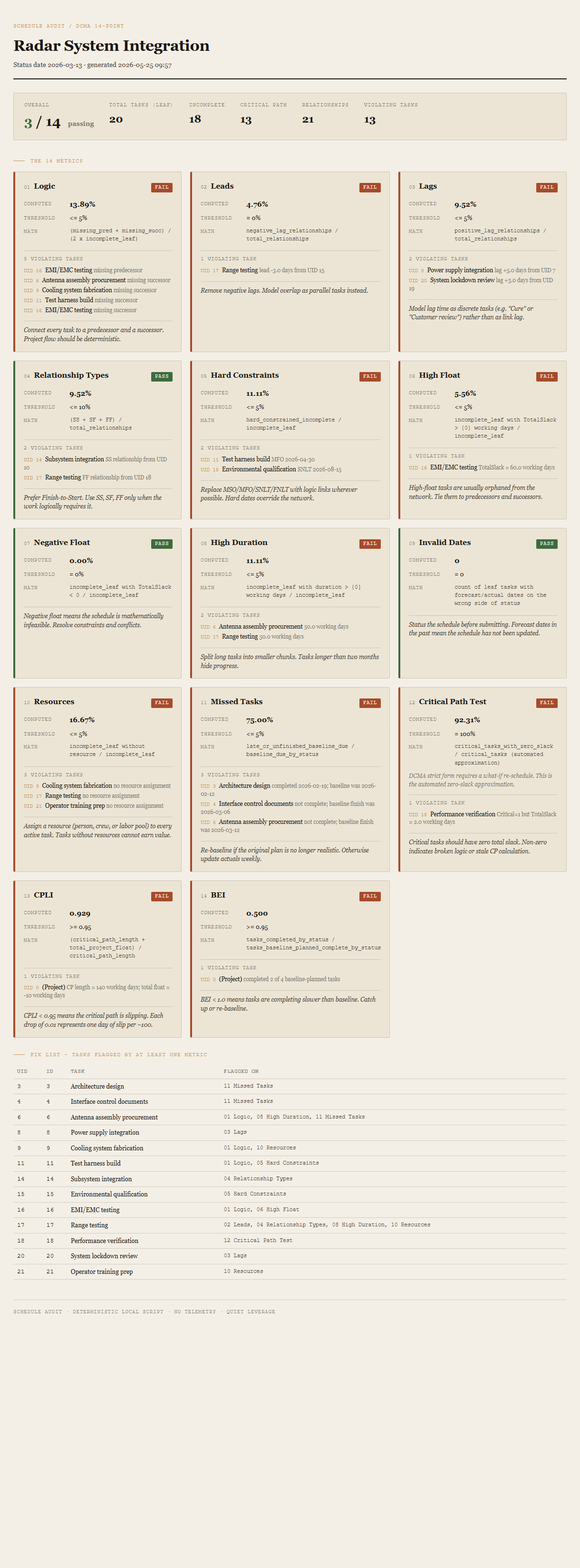
The fourteen metrics
Fix list
Combined table of every task that triggered at least one violation, with UID, ID, name, and the comma-separated list of metric numbers it appears in. This is the worksheet the PM takes back into Project.
Requirements
- OSWindows, macOS, or Linux
- RuntimePowerShell 7+ (
pwsh). Windows PowerShell 5.1 is not supported. - BrowserAnything modern. Configuration UI is on
localhost:8771. - MS ProjectRequired only on the PM's machine, to do a one-time File → Save As → XML Format. The auditing machine never touches Project.
- NetworkNone. The tool reads a local file and writes a local file. No API, no cloud, no telemetry.
- DataNever leaves your machine. Schedule data sits on disk; HTML is generated locally; you decide who gets the file.
Claude could write this. Two reasons to prefer the script.
Some workplaces — defense, medical devices, finance, anywhere with a strict IT policy — won't let Claude or any AI tool touch production data. These tools run locally with no network calls. And even where AI is allowed, repeat workflows shouldn't cost tokens — a deterministic script runs the same way every time, for free, forever. The prompt guide below shows how this tool was built with Claude; the download is what you run after.
Three files. Free.
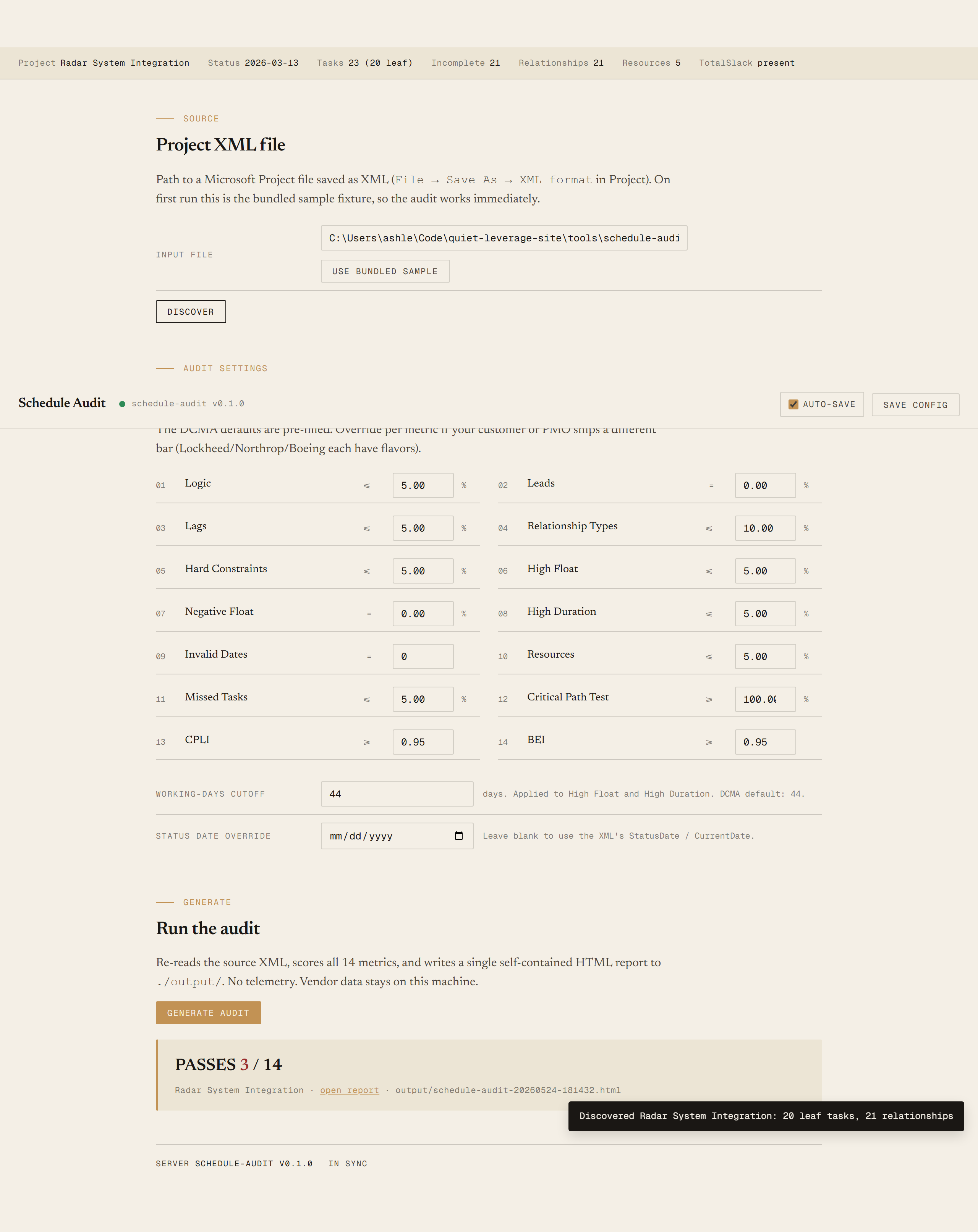
The tool itself, a user guide that walks through the one-time XML export and the Discover/Generate loop plus the per-PMO threshold overrides, and a prompt guide showing how this was built with Claude Code — the spec, the hand-crafted fixture with every DCMA violation seeded, and the Pester contract that pins each metric's count.
Drop your email to unlock the downloads.
One email when new tools ship, digest only. Confirms via Kit (double opt-in). No tracking. Unlocks every download on the site from this browser.
./start.ps1. No installer, no Project license needed on the running machine.