Schedule Share Report
Send your Microsoft Project schedule to anyone — execs, contractors, vendors — without buying everyone a Project license. The tool reads your Project file (saved as XML) and produces a single self-contained HTML report. Open it in any browser. Baseline variance is surfaced front and center, with the worst drift named at the top.
Two compounding pains in every MS Project shop.
Microsoft doesn't ship a free MPP viewer.
Project Standard runs $680+ per seat. To share a schedule with every stakeholder who needs visibility, you either pay for licenses they'll never otherwise use, print the schedule to a PDF (lossy, no zoom on long task lists), or hand-rebuild it in another tool. Free third-party viewers exist — Project Plan 365, Aspose, Zamzar — but each comes with a tax: they want your .mpp uploaded to their cloud (a non-starter for defense, medical devices, finance), they're 14-day trials, or they don't produce a single self-contained file you can email under NDA. A Medium piece is literally titled "Use SharePoint to avoid expensive MS Project licenses," and the Microsoft Community has dozens of threads asking how to view MPP without paying.
Project shows variance inside Project. Nowhere else.
Project does compute variance fields (StartVariance, FinishVariance, DurationVariance, WorkVariance, CostVariance) and surfaces them several ways inside the app — the Variance table view, Tracking Gantt, custom columns on any view, the Project Statistics dialog. What it doesn't produce is a one-page "here's where the schedule drifted and which tasks caused it" artifact a steering committee or a vendor can act on without opening Project. PMs end up hand-building variance summaries in Excel every reporting cycle.
"Once a project is underway, scheduled values are likely to drift away from the baseline you set, and those variances are clues that your project needs attention." MPUG · Certification Insider
This tool addresses both pains in a single artifact: a license-free HTML report that puts the variance numbers on page one.
One page, four sections, no Project required to read it.
The output is a single self-contained HTML file written to ./output/. System fonts, no external CSS or JS, prints cleanly, embeds in email. The four sections:
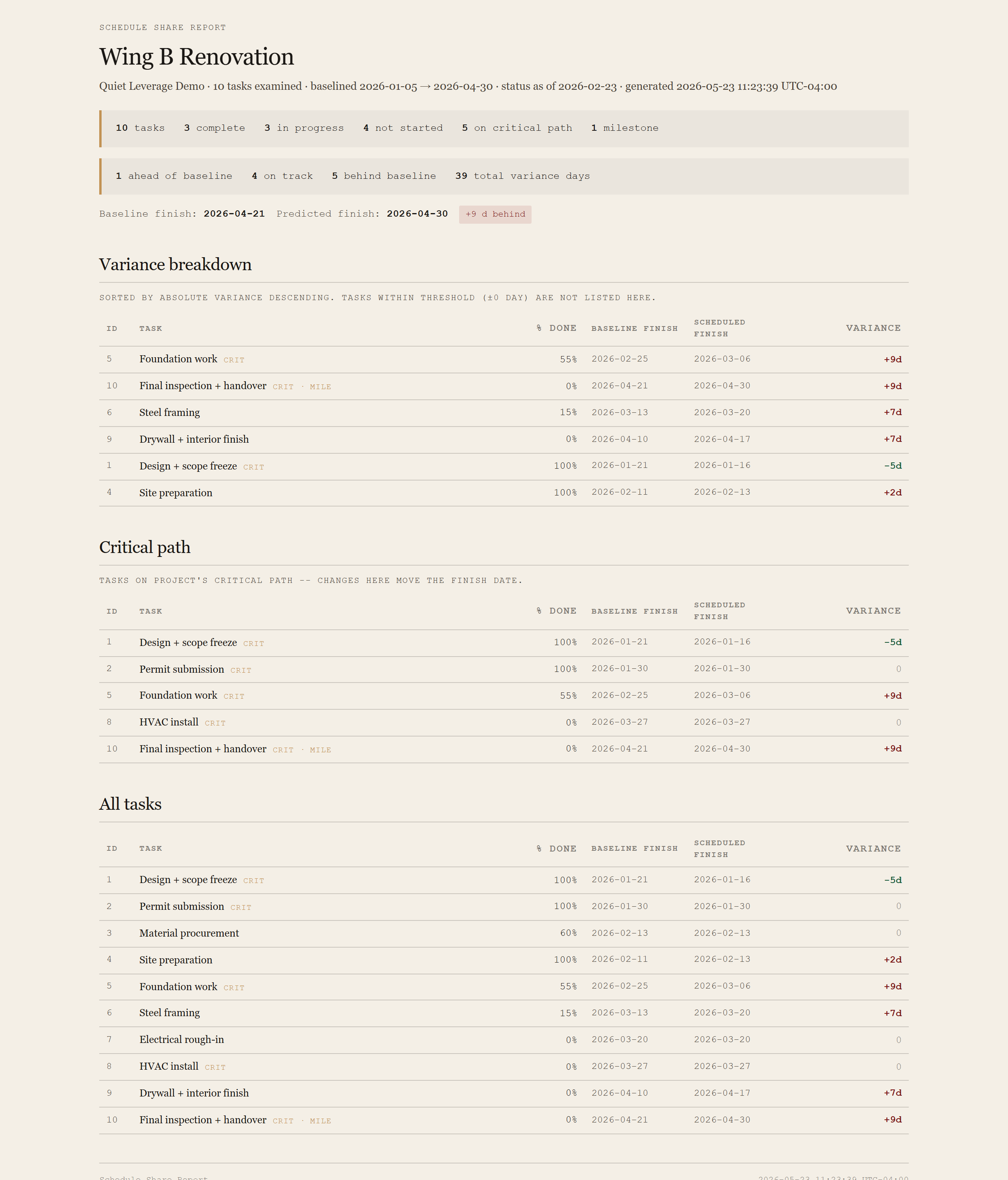
Summary card
Total tasks, complete / in-progress / not-started counts, critical-path count, milestone count, ahead/on-track/behind counts, total absolute variance in days, baseline finish vs predicted finish with a slip badge. Everything leadership asks in the first thirty seconds of a status meeting.
Variance breakdown
One row per task with non-zero variance, sorted by absolute variance descending. Worst drift at the top. Each row shows baseline finish, scheduled finish, variance in days, % complete, and tags critical-path tasks inline. This is the section that walks straight into the retro deck.
Critical path
Tasks Project flagged with Critical=1. These are the tasks where slip directly moves the finish date. Same column set as the variance table. Sorted by ID (chronological).
All tasks
Complete listing for reference. Same columns. Useful when leadership wants to scan past the drift section.
Requirements
- OSWindows, macOS, or Linux
- RuntimePowerShell 7+ (
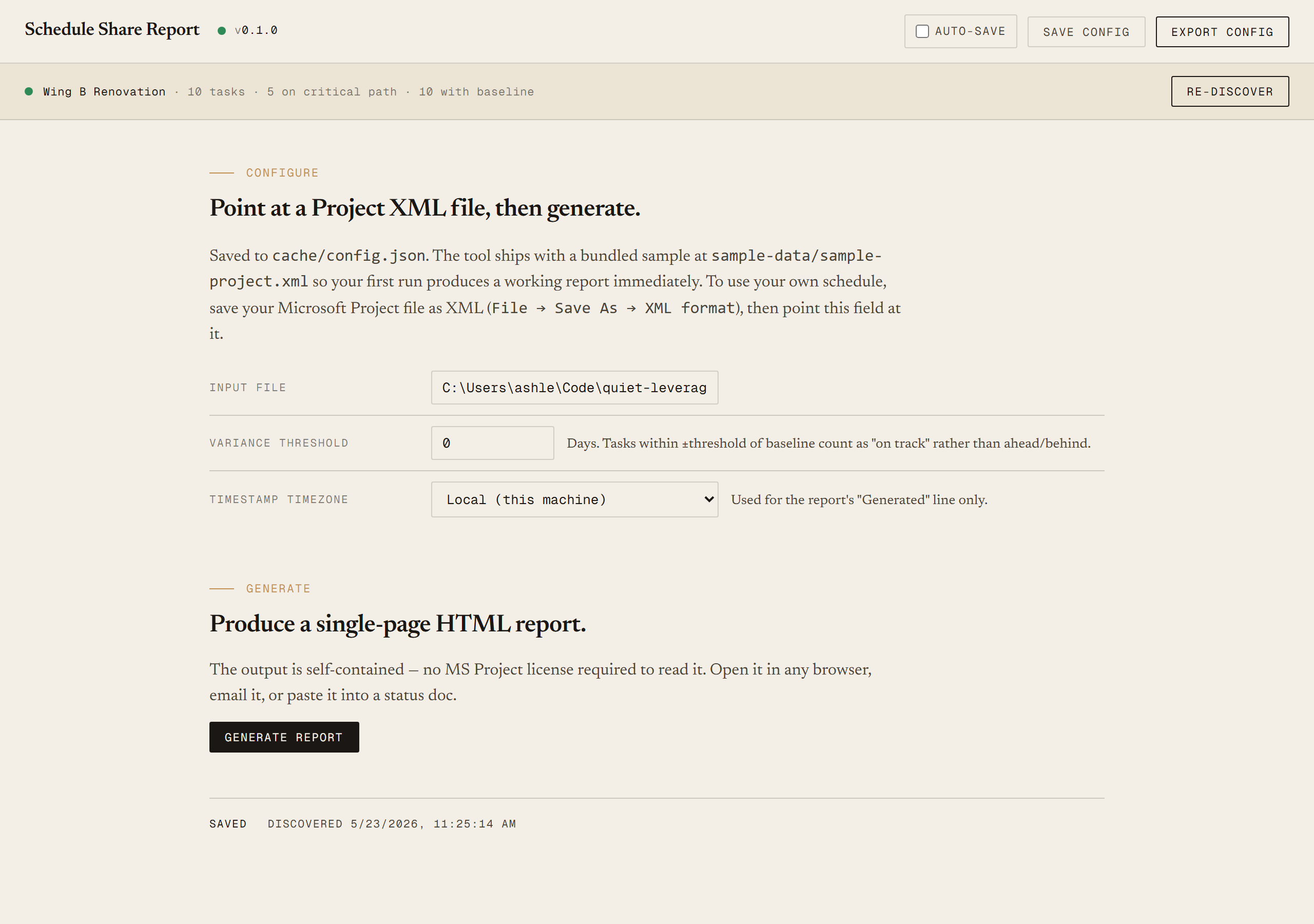
pwsh). Windows PowerShell 5.1 is not supported. - BrowserAnything modern. Configuration UI is on
localhost:8769. - MS ProjectRequired only on the PM's machine, to do a one-time File → Save As → XML Format. The reading machine never touches Project.
- NetworkNone. The tool reads a local file and writes a local file. No API, no cloud, no telemetry.
- DataNever leaves your machine. Schedule data sits on disk; HTML is generated locally; you decide who gets the file.
Claude could write this. Two reasons to prefer the script.
Some workplaces — defense, medical devices, finance, anywhere with a strict IT policy — won't let Claude or any AI tool touch production data. These tools run locally with no network calls. And even where AI is allowed, repeat workflows shouldn't cost tokens — a deterministic script runs the same way every time, for free, forever. The prompt guide below shows how this tool was built with Claude; the download is what you run after.
Three files. Free.
The tool itself, a user guide that walks through the one-time XML export and the Discover/Generate loop, and a prompt guide showing how this was built with Claude Code — including the design choice to bypass .mpp parsing entirely in favor of Project's open XML format.
Drop your email to unlock the downloads.
One email when new tools ship, digest only. Confirms via Kit (double opt-in). No tracking. Unlocks every download on the site from this browser.
./start.ps1. No installer, no Project license needed on the running machine..mpp directly, the synthetic fixture pattern, the Pester contract that pins every variance number.