Butler Health Report
Trello's Butler automation rules fail silently. The rule that pages the on-call when an incident card hits Intake just stops firing one Tuesday and Butler does not send a notification — you find out when the next incident lands and nobody gets paged. The native log is per-rule and chronological with no aggregate cadence view, no trend, and no "this rule stopped working" detection. This tool parses the Butler command-action stream, computes week-over-week fire cadence per rule, detects command-limit ceiling hits, and flags rules whose trigger-to-success ratio has collapsed — five verdicts in severity order, plus a CRITICAL/ROUTINE tier from the rule name and a workspace-level GREEN/AMBER/RED signal.
Butler stops firing. Nothing tells you.
Two Atlassian Community threads describe the same shape from different angles. "What the heck is going on with Trello Automations" is the visible-failure version: rules that worked yesterday do not fire today, the team finds out when the auto-comment they were waiting for never lands, and there is no surface inside Trello that says "this rule stopped working." "Automation fails — sometimes" is the half-broken version: the rule fires most of the time, fails the rest, and downstream consumers see the side effect happen sometimes — so they assume it always happens until the day a missing label or a missing comment costs them a deadline. Both threads end the same way: multiple users reporting the same pattern, no diagnostic surface to point at, no notification when a rule degrades.
The framing is the same as the rest of the Trello cluster: make your board audit-ready before someone asks. The first three entries cover what's visible on the card face and below it — the aging signal, the archive disposition, the checklist ghosts. This one covers the layer that actually moves the work: the Butler rules that route cards, page on-call, label incoming items, and notify reviewers. When the rule that pages the incident-commander when an SLA timer expires goes dead on a Tuesday, the first thing you learn about it is on Friday when an incident-commander asks why she did not get paged at 03:14. Butler's per-rule chronological log will show you the rule has not fired in three days — if you know to look at that specific rule's log and you can read the gap. There is no rollup, no cadence view, no "rule stopped working" detection. This tool is the rollup.
Five verdicts in severity order, CRITICAL tiering, workspace verdict.
Every rule gets exactly one verdict
The cascade evaluates in severity order and the first matching verdict wins: DEAD > CHOKING > DEGRADED > STALE > HEALTHY. A rule that had a recent baseline of 5+ fires AND is now hitting the command-limit ceiling repeatedly gets DEAD, not CHOKING — the worst-fit verdict wins. Per-rule metrics are computed against the configurable lookback (default 28 days, two 14-day windows so cadence is compared against the prior period).
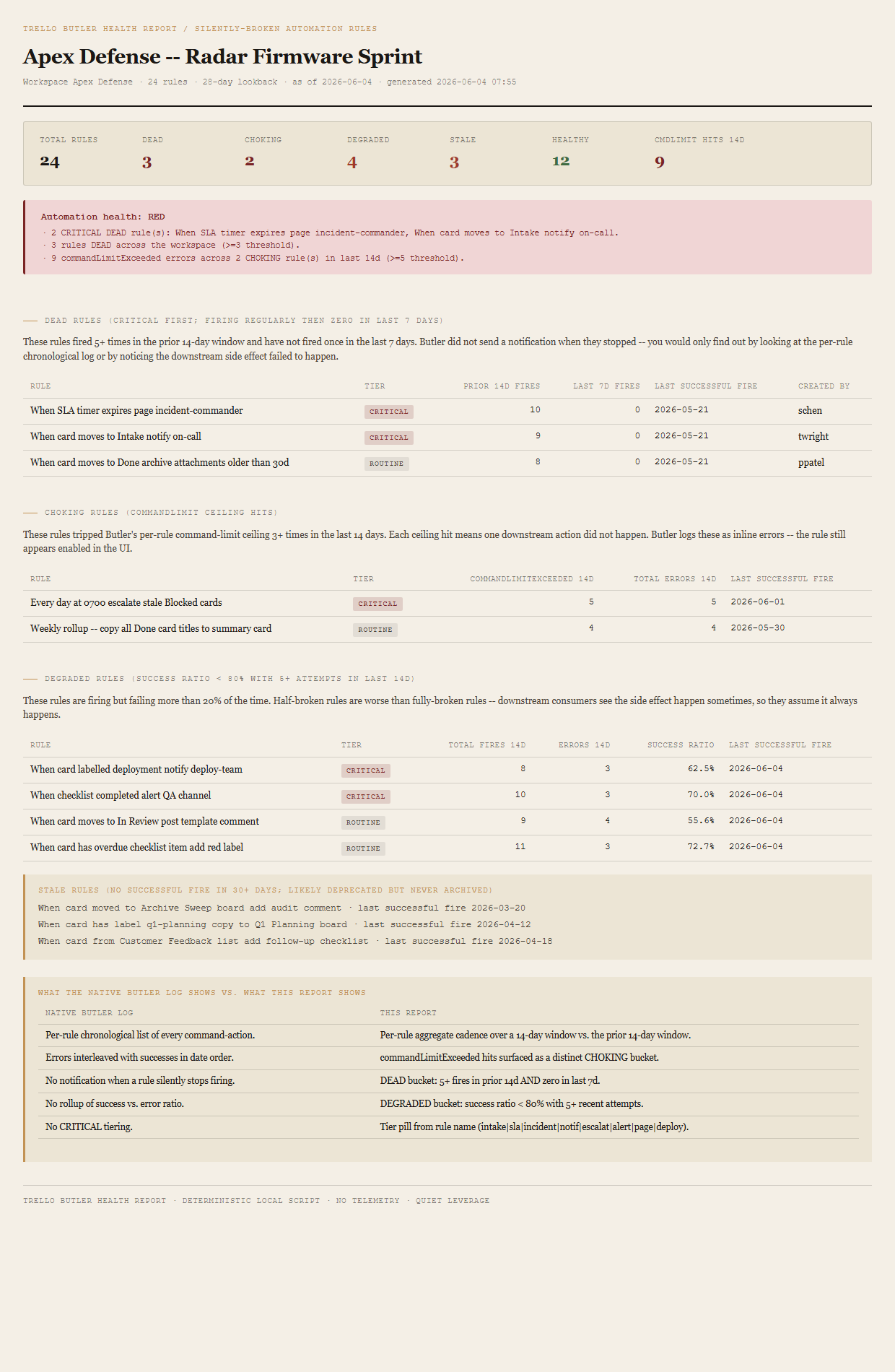
firesInPriorWindow >= 5 AND firesInLast7Days == 0. Rule was firing regularly — at least 5 successful fires in the 14-day window before the most recent 14 days — and has not fired once in the last 7 days. The textbook silent-failure case: a rule with an established baseline that stopped, with no notification, that you only find out about by looking at the per-rule log or noticing the downstream side effect didn't happen.
commandLimitHits >= 3 in last 14 days. Butler's per-rule command-limit ceiling is being hit repeatedly. Each ceiling hit means one downstream action did not happen — Butler logs them as inline errors but the rule still appears enabled in the UI. The CHOKING bucket is the half-broken cousin of DEAD: the rule is still firing on some triggers but consistently failing on others because the rule's command count per invocation exceeds Butler's limit.
successRatio < 0.80 in last 14 days with >= 5 total fire attempts. Rule is firing but failing more than 20% of the time. Half-broken rules are operationally worse than fully-broken rules — downstream consumers see the side effect happen sometimes and assume it always happens. The 5-attempt minimum prevents one error on a brand-new rule from tripping DEGRADED on a single bad sample.
lastSuccessfulFireAt > 30 days ago AND not DEAD/CHOKING. Rule has not fired successfully in over a month but didn't have the recent-baseline shape that would have flipped it to DEAD. Almost always means the rule was written for a workflow that's been retired, the trigger card-list was renamed, or the team moved on — deprecated but never archived. STALE rules are the cleanup target, not the failure target.
Per-rule tier from the rule name
Each rule is tagged CRITICAL or ROUTINE based on a case-insensitive regex against the rule name. The regex is the operational-load-bearing word list: intake|sla|incident|notif|escalat|alert|page|deploy. A DEAD rule named "When card moves to Done archive attachments older than 30d" is annoying; a DEAD rule named "When SLA timer expires page incident-commander" is a real incident. The tier pill makes the difference visible at a glance and the DEAD table sorts CRITICAL rows first.
Two-window cadence comparison
The default 28-day lookback is split into two 14-day windows: prior (days 15–28 ago) and recent (days 1–14 ago). DEAD compares the prior window's fire count against the most recent 7 days — long enough for the gap to be material, short enough to surface within a working week. CHOKING and DEGRADED both look at the recent 14-day window only. STALE looks across all history for the rule's most recent successful fire.
Workspace verdict roll-up
One verdict per board run, set by the worst-fired threshold. Each independent trigger appends its own reason to the verdict block so the reader sees every threshold that fired:
- REDAny CRITICAL rule is DEAD, OR 3+ rules are DEAD across the workspace, OR 5+
commandLimitExceedederrors across the workspace in last 14 days. - AMBERAny rule is DEAD or CHOKING (and no RED trigger fired), OR 3+ DEGRADED, OR 5+ STALE.
- GREENOtherwise.
The bundled fixture lands RED via three independent triggers: 2 CRITICAL DEAD rules ("When SLA timer expires page incident-commander" and "When card moves to Intake notify on-call"), 3 total DEAD rules across the workspace, and 9 commandLimitExceeded errors across the 2 CHOKING rules in the last 14 days. Any one of the three alone would have tripped RED — the fixture pins all three so the verdict path is exercised on the first render and the reason list shows the stacked triggers.
What ends up on the page
Kicker + h1 (board name) + meta line (workspace, rule count, lookback days, asOfDate, generated timestamp). Summary row (total rules / DEAD / CHOKING / DEGRADED / STALE / HEALTHY / commandLimitExceeded hits in last 14d). Workspace-level verdict (GREEN/AMBER/RED) with one bullet per triggered reason. DEAD-rules table sorted CRITICAL first, then by prior 14d fires descending (Rule, Tier pill, Prior 14d fires, Last 7d fires, Last successful fire, Created by). CHOKING-rules table sorted by commandLimitExceeded count descending (Rule, Tier, commandLimitExceeded 14d, Total errors 14d, Last successful fire). DEGRADED-rules table sorted by success ratio ascending (Rule, Tier, Total fires 14d, Errors 14d, Success ratio, Last successful fire). STALE-rules callout listing names + last-fire dates. "What the native Butler log shows vs. what this report shows" side-by-side callout. Footer.
The honest scope of v1.
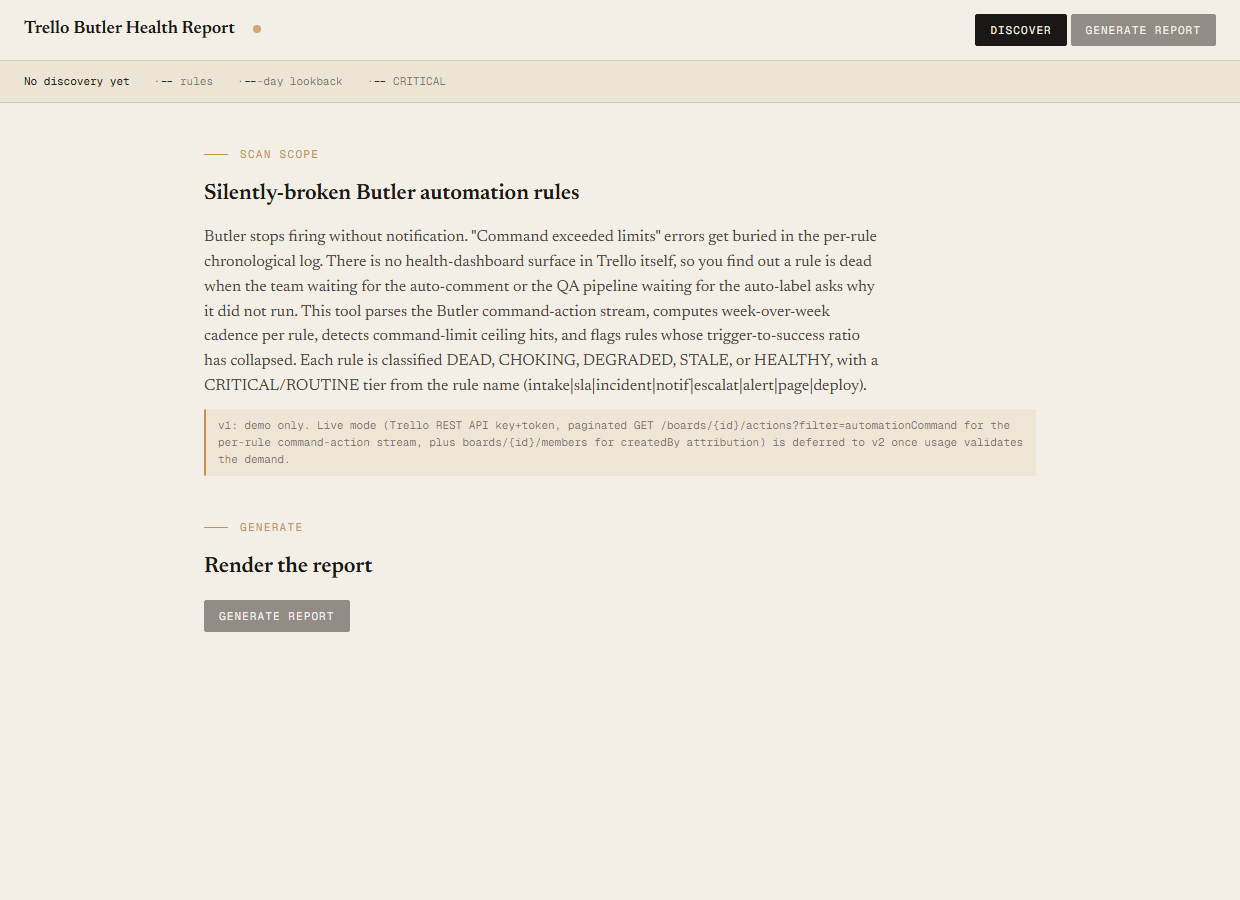
v1 is demo mode only. The discover script reads the bundled sample-data/butler.json fixture — an Apex Defense workspace with one board ("Apex Defense — Radar Firmware Sprint") and 24 Butler rules engineered to break down 3 DEAD (2 CRITICAL: "When SLA timer expires page incident-commander", "When card moves to Intake notify on-call"; 1 ROUTINE) plus 2 CHOKING (9 commandLimitExceeded hits total across the two rules), 4 DEGRADED (success ratios 0.556–0.727), 3 STALE (last fires 47–76 days ago), and 12 HEALTHY. You can evaluate the verdict cascade, the CRITICAL tiering, the two-window cadence comparison, and the three independent RED triggers end-to-end with no Trello credentials. Live mode (Trello REST against /boards/{id}/actions?filter=automationCommand paginated by before= cursor for the per-rule command-action stream, plus /boards/{id}/members for the createdBy cross-reference and the Butler-rules listing surface so rules that didn't fire in the lookback window can still be enumerated as STALE) is deferred to v2 once usage validates the demand.
Doesn't fix the rules. This is a read-only audit. The tool tells you which rules look dead, choking, degraded, or stale, with the per-window counts and the last-successful-fire timestamps spelled out. It does not edit the rules, archive them, reset their command-limit ceiling, or open Butler's editor for you. The remediation lives with the human reading the report — the audit surfaces the work, the team does it. v2 might link each rule row to its Butler edit page; v1 surfaces names only.
Doesn't replace Butler's own log. Butler's per-rule chronological log shows you every individual command-action with its outcome and timestamp — that's the right surface when you already know which rule is broken and you need to see why a specific invocation failed. The audit is the layer above that: it tells you which rules are broken before you go looking at any individual log. Read the audit first, then drill into Butler's log for the specific failed actions. v1 surfaces names, counts, and ratios; it does not replicate the per-action detail.
Doesn't detect logic bugs. The audit reads the fire-cadence and success-ratio signals from the command-action stream. A rule that fires successfully every time but does the wrong thing — labels the wrong cards, moves cards to the wrong list, posts the wrong comment — lands HEALTHY in this report because Butler reports the action as a success. Logic bugs need a different audit shape (probably a side-effect-vs.-intent check that's hard to write without team-specific context). This tool catches the silent-fire-failure modes; it doesn't catch the silent-wrong-behaviour modes.
The log is per-rule chronological. The audit is per-workspace aggregate.
Butler's native log is a chronological list of every command-action a single rule has fired, with outcome and timestamp interleaved in date order. It's the right surface when you already know the rule and want to see the individual invocation. It does not aggregate across rules, does not compute cadence, does not flag "this rule stopped working," and does not surface the CRITICAL vs ROUTINE distinction — so a DEAD intake-routing rule and a DEAD weekly archive-cleanup rule look the same in the per-rule view. The audit is the rollup the native log doesn't produce: workspace-wide cadence comparison, command-limit ceiling detection, success-ratio collapse detection, and CRITICAL tiering so the operationally-load-bearing rules surface first.
Requirements
- OSWindows, macOS, or Linux
- RuntimePowerShell 7+ (
pwsh). 5.1 is not supported. - BrowserAnything modern. UI on
localhost:8796. - TrelloLive mode deferred to v2 — will use Trello REST (
api.trello.com/1) with a personal API key + token, paginated against/boards/{id}/actions?filter=automationCommandfor the per-rule command-action stream. v1 demonstrates the report shape on a bundled fixture. - Demo modeBundled 24-rule Apex Defense fixture — runs end-to-end with no creds, lands RED via 3 independent triggers (2 CRITICAL DEAD, 3 total DEAD, 9 commandLimitExceeded hits in 14d).
Three files. Free.
The tool, a user guide, and a prompt guide showing the spec, the fixture engineering that pins the 3/2/4/3/12 verdict counts and the 9 commandLimitExceeded total, and the Pester contract.
Drop your email to unlock the downloads.
One email when new tools ship, digest only. Confirms via Kit (double opt-in). No tracking. Unlocks every download on the site from this browser.
./start.ps1.