MSP ↔ Trello Drift Report
The planning team owns Microsoft Project. The execution team owns Trello. The two drift apart silently — cards move without the schedule reflecting it, baselines slip without the board catching up. This tool reads both and produces one HTML page showing exactly where the official plan and the execution-of-record disagree. Runs in demo mode against bundled fixtures, or in live mode against your own MSP XML and a real Trello board pulled over the REST API.
Plan-of-record vs execution-of-record, with no native bridge.
Regulated-industry PMs — defense, medical devices, finance — own MSP as the schedule of record: baseline, resource leveling, critical path, the document the customer signed off on. Execution teams own a Trello board because that's the surface engineering, ops, and manufacturing actually want. They want cards, not Gantt rows. Both are correct on their own terms. They are not correct together.
There is no native bridge. Microsoft's "Project for the web + Planner" path is irrelevant to anyone on desktop MSP; Trello has no MSP-aware integration. Reconciling the two today is a manual weekly or monthly copy-paste exercise: open the schedule, open the board, eyeball which cards correspond to which tasks, note where the dates don't agree, note where the status doesn't agree, note where the people doing the work aren't the people the schedule says are doing the work, note which scheduled tasks don't have a card at all, note which cards aren't on the schedule at all. The drift is invisible until a PMO review surfaces it weeks later. This tool does that reconciliation in one pass and produces a single shareable HTML page.
Two inputs in, one page out.
The tool takes two inputs: a Microsoft Project XML export (the schedule) and the Trello board (the execution surface). The output is a single self-contained HTML file written to ./output/: system fonts, no external CSS or JS, prints cleanly, embeds in email.
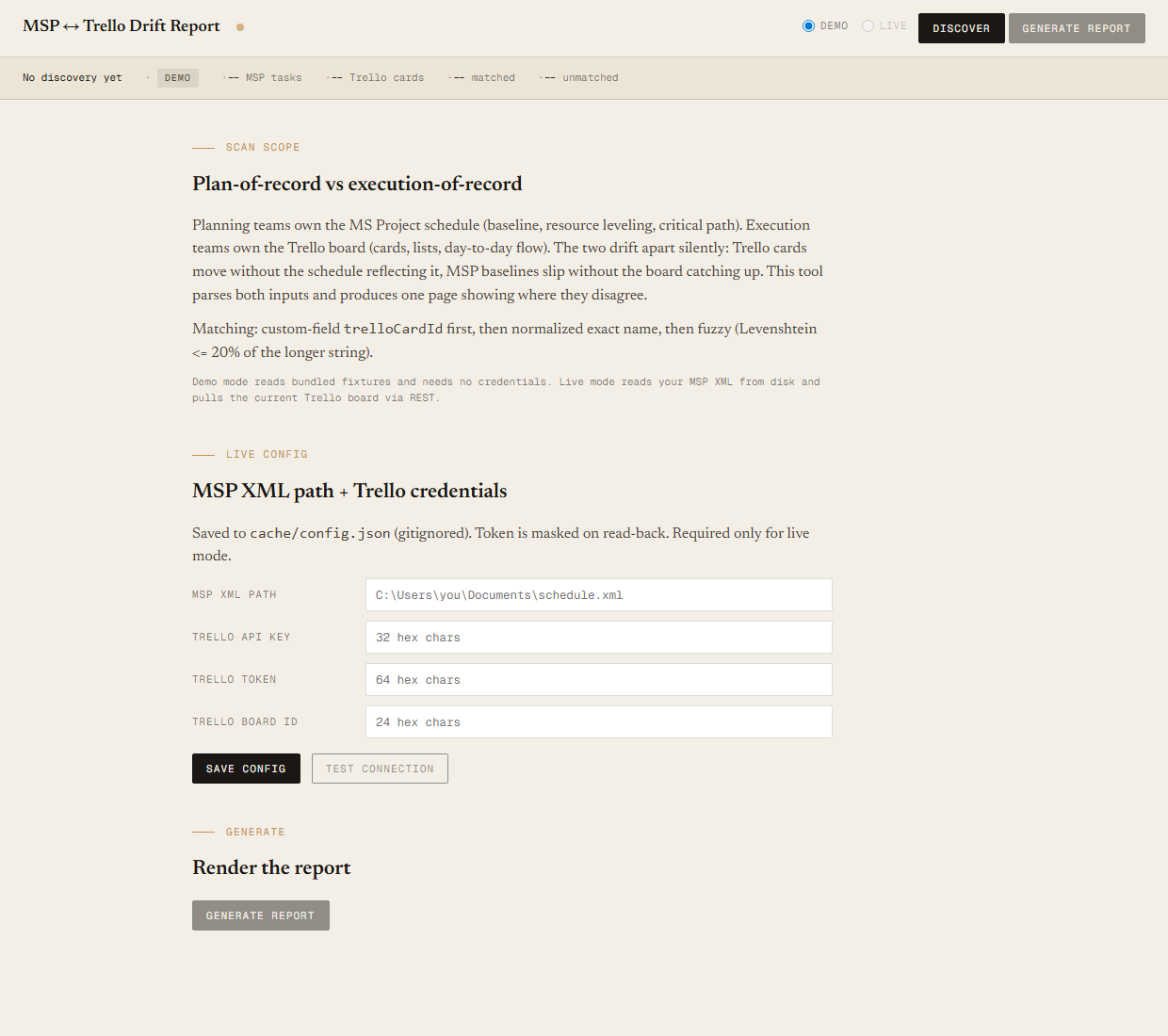
Two modes via the -Mode flag on discover.ps1 and generate.ps1, default demo. Demo mode reads bundled fixtures from sample-data/ — no credentials, no network — so you can sanity-check the matcher, the classifier, and the report shape before pointing the tool at anything real. Live mode reads a real MSP XML from a path you set in the config file and pulls the current Trello board over the REST API (board metadata, lists, members, open cards) using your own API key and token. Same matcher, same drift logic, same HTML — only the data source differs. Demo output lands at output/msp-trello-drift-<timestamp>.html; live output uses a separate msp-trello-drift-live-<timestamp>.html prefix so the two never overwrite each other.
Matching, in three strategies
Every MSP leaf task is matched to at most one Trello card. First match wins; once a task or card is matched, it leaves the candidate pool. The three strategies run in order:
- Custom-field
trelloCardId. If the MSP task carries an extended attribute that points at a Trello card id, match on that. Exact, deterministic, intentional — the planning team explicitly says which card represents which task. - Exact name match (normalized). Both names are lowercased, trimmed, and stripped of leading prefixes (
TASK-123:,1.2,1),1.). If the normalized strings are equal, match. - Fuzzy match. Levenshtein distance divided by the longer name's length, threshold
<= 0.20. Catches the renamed-card-since-MSP-export problem — "Replace legacy Doppler filter with vector-pipelined version" vs "Doppler filter replacement (vector-pipelined)" still pair up.
Drift signals, per matched pair
- scheduleDrift.
abs(MSP Finish - Trello due)in working days (Mon-Fri). <=2 aligned, 3-10 drift, >10 serious. Null if the Trello card has no due date. - statusDrift. MSP
%Completetier (Not started / In progress / Complete) vs Trello list tier (BACKLOG · ACTIVE · REVIEW · BLOCKED · DONE) resolved from the list name. MISMATCH if the tiers don't agree. - resourceDrift. MSP resource names vs Trello card member full names. MISMATCH if the intersection is empty and both sides have at least one name.
Four matched-task verdicts, severity-ordered
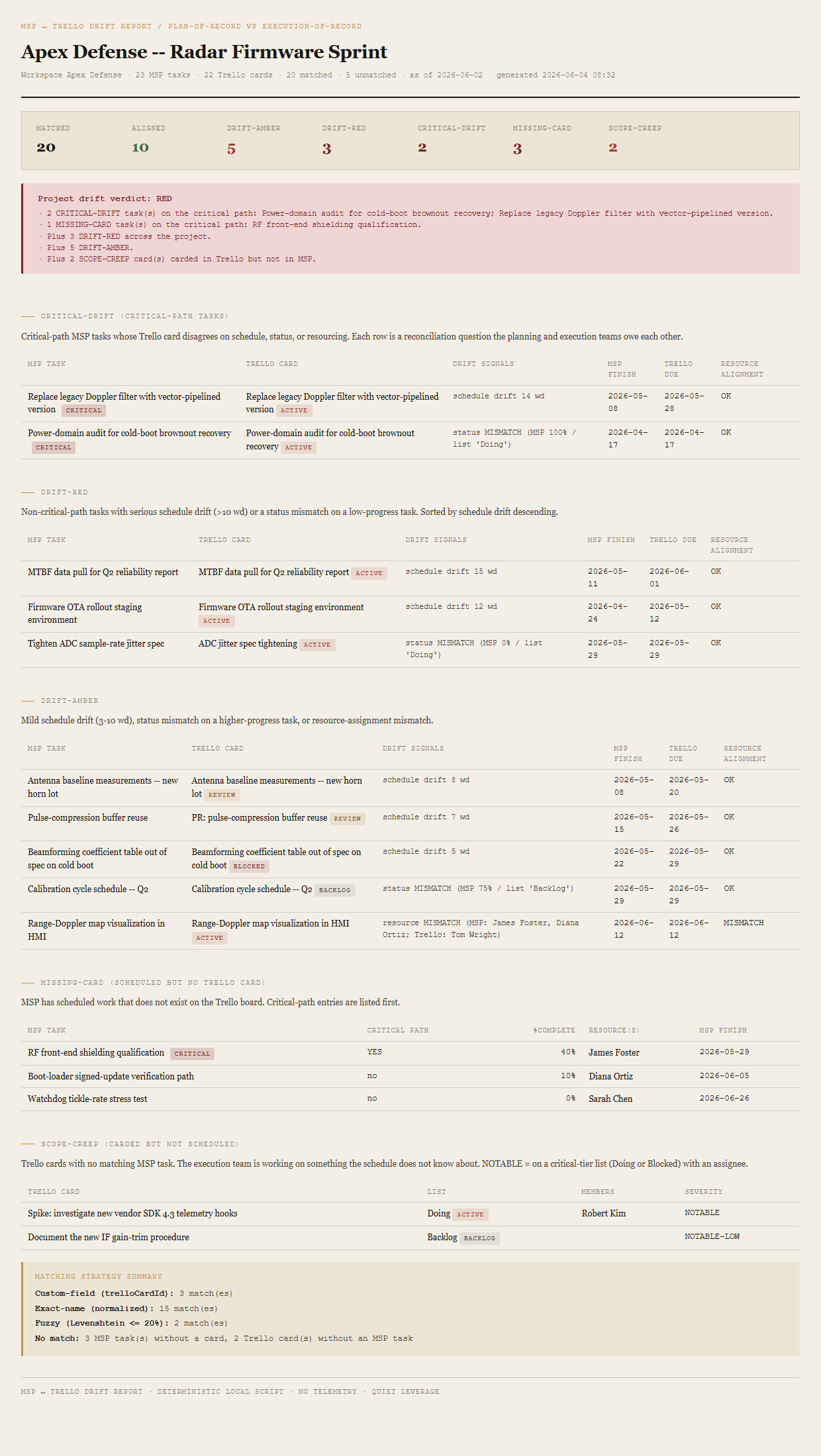
- CRITICAL-DRIFTTask is on the MSP critical path AND any drift signal is flagged. Surfaces first in its own table.
- DRIFT-REDSchedule drift >10 working days, OR status mismatch on a critical-path task, OR status mismatch on a task below 50% complete.
- DRIFT-AMBERSchedule drift 3-10 working days, OR a plain status mismatch, OR a resource-assignment mismatch.
- ALIGNEDAll signals within tolerance. Counted in the summary; not listed row by row.
Two unmatched categories
- MISSING-CARDMSP task with no Trello card. CRITICAL subseverity if the task is on the critical path. The execution team forgot to make a card for scheduled work.
- SCOPE-CREEPTrello card with no MSP task. NOTABLE if the card is on a critical-tier list (ACTIVE or BLOCKED) with at least one assignee, else NOTABLE-LOW. The execution team is working on something the schedule does not know about.
Project verdict, rolled up
RED if any CRITICAL-DRIFT, OR any MISSING-CARD on the critical path, OR 5+ DRIFT-RED total. AMBER if any DRIFT-RED, OR any MISSING-CARD, OR 3+ DRIFT-AMBER, OR 3+ SCOPE-CREEP NOTABLE. GREEN otherwise. The verdict block names its reasons inline so the steering committee reads the trigger, not just the colour.
The HTML report itself contains the project header and meta line, the summary row, the verdict block, the four matched tables (CRITICAL-DRIFT, DRIFT-RED, DRIFT-AMBER, plus the ALIGNED summary count), the two unmatched tables (MISSING-CARD with critical rows first, SCOPE-CREEP with NOTABLE first), and a matching-strategy callout naming how many pairs each strategy produced.
Read-only by design. The Sync tool handles the writes.
This is a diff tool, not a sync tool. Live mode is read-only by design. It pulls Trello state with five GET endpoints (board, lists, members, cards, token validation) and nothing else — no card creation, no due-date updates, no list moves, no archives. The five-endpoint surface area is the safety guarantee: there is no code path in this tool that writes to Trello in any mode.
The companion MSP ↔ Trello Sync tool is the operational sibling that handles writes. Once the drift report has been trusted enough to act on, Sync takes the next step — push direction creates the missing cards and updates the changed fields; pull direction proposes the MSP edits the PM applies by hand. The two-tool split is deliberate: a diff you can run without consequence, then a separate tool with its own safety rails for the writes.
The tool does not replace the MSP schedule. It does not replace the Trello board. It does not consolidate the two into a single system. It shows the gap. The two systems continue to live where they live, run by the people who run them.
The matching alone is what breaks the manual approach.
23 MSP leaf tasks against 22 Trello cards, three drift signals per matched pair, per-row resource-name intersection on top of that — the comparison is several hundred individual judgements. Eyeballing it once a month is the workflow that gets skipped first when the PM is busy.
Even with patience, the matching is the part that breaks. The execution team renames cards. The planning team uses task IDs and prefixes. A normalized exact-name comparison gets you most of the way; the renamed-card cases need fuzzy distance to catch them. Doing that in a spreadsheet is what nobody actually does.
Requirements
- OSWindows, macOS, or Linux
- RuntimePowerShell 7+ (
pwsh). Windows PowerShell 5.1 is not supported. - BrowserAnything modern. Configuration UI is on
localhost:8797. - MS ProjectDemo mode bundles a synthetic XML fixture — no Project install needed to try the tool. To run live against your own schedule, the PM's machine needs Project for a periodic File → Save As → XML Format.
- TrelloDemo mode bundles a synthetic board fixture. Live mode requires a Trello API key + token from trello.com/app-key and the 24-character board ID from the board's URL.
- NetworkNone in demo. Live mode makes five read-only GETs against the Trello API per run.
- DataNever leaves your machine. Schedule and board data are pulled locally; HTML is generated locally; you decide who gets the file.
Live mode setup
Live mode reads its configuration from cache/config.json (gitignored). Four fields: mspXmlPath (absolute path to your MSP XML), trelloApiKey (32 hex chars from trello.com/app-key), trelloToken (64 hex chars, generated from the same page), and trelloBoardId (24 hex chars from the board's URL). Save the config through the builder UI's config form, then click Test connection — the tool runs the full pre-flight (config valid, MSP file exists, token valid, board reachable) and surfaces the resolved board name on success. The Live radio in the UI stays disabled until config is saved and pre-flight passes. The token is never logged or echoed in script output, and GET /api/config returns a redacted view (first 8 chars only) so the UI can confirm a token is set without exposing it. The tool is read-only by design in every mode — the five endpoints it calls are all GETs.
For the MSP path specifically: drop the exported XML onto the builder's drop zone and the tool uploads it, sanitizes the filename, and auto-fills the path field. A Recent files dropdown beneath the input remembers the last five for one-click reuse.
Claude could write this. Two reasons to prefer the script.
Some workplaces — defense, medical devices, finance, anywhere with a strict IT policy — won't let Claude or any AI tool touch production data. These tools run locally with no network calls. And even where AI is allowed, repeat workflows shouldn't cost tokens — a deterministic script runs the same way every time, for free, forever. The prompt guide below shows how this tool was built with Claude; the download is what you run after.
Three files. Free.
The tool itself, a user guide that walks through the Discover/Generate loop and how to read every section of the report, and a prompt guide showing how this was built with Claude — including the two-fixture design (synthetic MSP XML plus a synthetic Trello board JSON) that engineers the RED verdict deterministically.
Drop your email to unlock the downloads.
One email when new tools ship, digest only. Confirms via Kit (double opt-in). No tracking. Unlocks every download on the site from this browser.
./start.ps1.