MSP ↔ Trello Sync
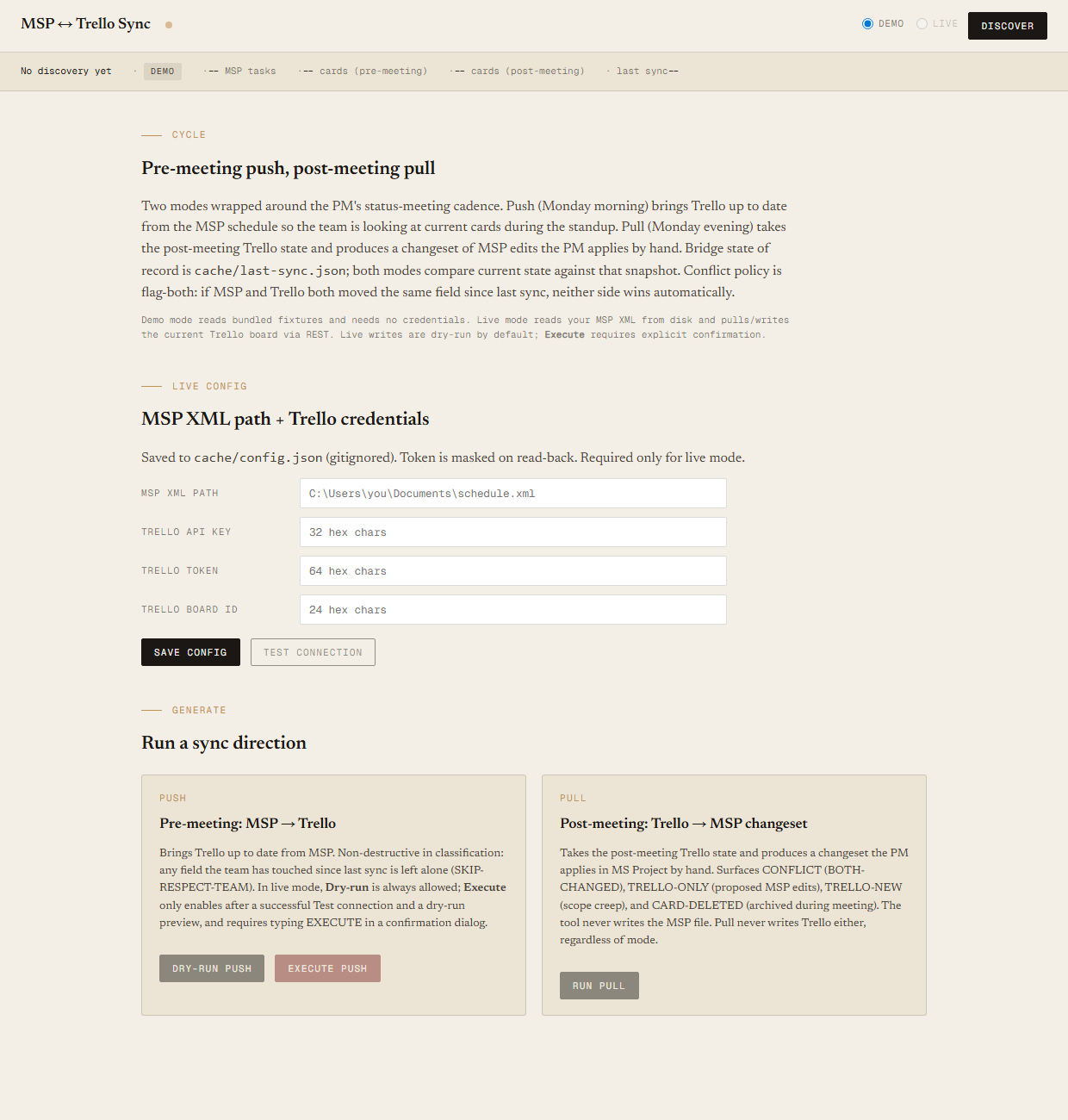
Push direction runs Monday morning: take the latest MSP XML and bring Trello cards up to date before the status meeting. Pull direction runs Monday evening: take the post-meeting Trello board and produce the changeset of MSP edits the PM applies by hand. When MSP and Trello have both moved the same field since last sync, neither side wins automatically — the tool flags the conflict and lets the PM resolve it deliberately. Runs in demo mode against bundled fixtures, or in live mode against your own MSP XML and a real Trello board with four safety rails standing between the dry-run preview and an actual API write.
The MSP plan and the Trello board, reconciled around the meeting that needs them both.
The PM running an MSP-managed project also runs status meetings off a Trello board, because Gantt rows don't work for a standup. The two have to stay in sync or the meeting talks about stale work and the schedule fills with outdated %Complete numbers. Today the reconciliation is manual: open MSP, open Trello, eyeball the deltas, copy values across. Weekly, 30 to 60 minutes, with a predictable error rate — the kind of unglamorous PM bookkeeping that gets done at half the depth it needs because there is always something more urgent.
The existing MSP ↔ Trello Drift Report (Entry 07) tells you where the two are out of sync. This tool produces the operations that close the gap, in the cadence the PM actually works: push the plan to Trello before the meeting so the team is looking at current cards during the standup, pull the changeset from Trello after the meeting so the schedule absorbs whatever was negotiated. The flag-both conflict policy is the honest one. If MSP says "due 2026-07-01" and during the meeting the team negotiated "due 2026-07-15" with the PM, neither side wins automatically — the PM resolves the conflict deliberately.
Two directions, two modes, one matcher, one bridge state of record.
The tool has two independent axes. Direction (push or pull) is the workflow side — push runs pre-meeting and brings Trello up to date from MSP; pull runs post-meeting and produces a changeset of MSP edits for the PM to apply by hand. Mode (demo or live) is the data source. Demo mode reads four bundled fixtures — schedule.xml, board-before-meeting.json, board-after-meeting.json, and a last-sync.json snapshot from the prior week — with no credentials and no network, identical output to every prior run. Live mode reads a real MSP XML from a path you set in the config file and pulls the current Trello board over the REST API. Same matcher, same classifier, same report HTML — only the source of the data changes.
Bridge state of record is cache/last-sync.json; every classification compares current state against that snapshot. In demo mode, discover.ps1 copies the bundled snapshot into the cache on first run. In live mode, discover.ps1 refreshes the snapshot to reflect current MSP + Trello state; a successful live push with -Execute -Confirm refreshes it again to the post-push state so the next cycle starts from a clean baseline. Dry-run live runs do not touch last-sync.json.
The -Mode push|pull parameter from v1 has been renamed to -Direction push|pull to disambiguate from the data-source axis. The old name is kept as a back-compat alias, so existing v1 invocations still work.
Matching, in three strategies (same as the Drift Report)
Every MSP leaf task is matched to at most one Trello card. First match wins; once a task or card is matched, it leaves the candidate pool. The three strategies run in order:
- Custom-field
trelloCardId. If the MSP task carries an extended attribute that points at a Trello card id, match on that. Exact, deterministic, intentional. - Exact name match (normalized). Both names lowercased, trimmed, leading prefixes stripped (
TASK-123:,1.2,1),1.). - Fuzzy match. Levenshtein distance divided by the longer name's length, threshold
<= 0.20. Catches the renamed-card-since-MSP-export problem.
Push mode — pre-meeting (MSP → Trello)
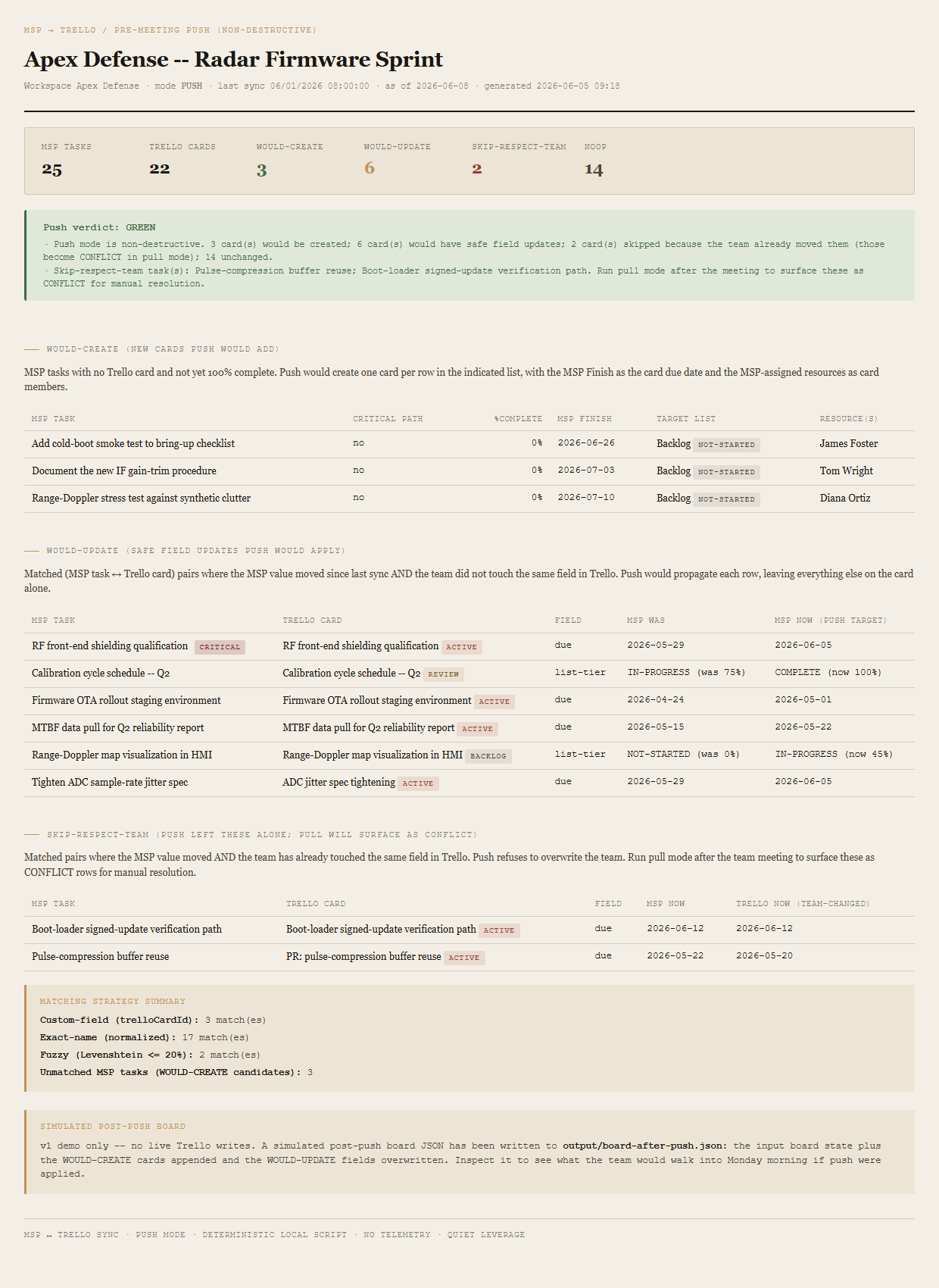
Inputs: schedule.xml + board-before-meeting.json + last-sync.json. For each matched pair, four fields are compared field by field (due, idList tier, idMembers, name) against the last-sync snapshot. A field is MSP-CHANGED if it differs from the MSP-in-last-sync value; TRELLO-CHANGED-SINCE-SYNC if the Trello value differs from the Trello-in-last-sync value.
- WOULD-CREATEMSP task with no Trello card AND
%Complete < 100. The push will create a new card on the list that matches the MSP status tier. - WOULD-UPDATEMSP-CHANGED and not TRELLO-CHANGED-SINCE-SYNC. Safe to overwrite the Trello field with the MSP value.
- SKIP-RESPECT-TEAMMSP-CHANGED and TRELLO-CHANGED-SINCE-SYNC. Push leaves the field alone; the pull-side report will surface this as a CONFLICT for the PM to resolve manually.
- NOOPNeither side changed. Counted in the summary; not listed row by row.
Push verdict is GREEN by definition. Push is non-destructive in its classification — the only forward signal is the SKIP-RESPECT-TEAM count, which is the predictor of how many conflicts pull will surface after the meeting. Demo push writes output/board-after-push.json — the simulated post-push Trello state with the WOULD-CREATE cards appended and the WOULD-UPDATE fields overwritten — for visual inspection. Live push with -Execute -Confirm fires real Trello API calls: POST /1/cards for the WOULD-CREATE rows and PUT /1/cards/{id} for the WOULD-UPDATE rows, throttled at ≥100ms between calls, with every write captured in the audit log.
Pull mode — post-meeting (Trello → MSP changeset)
Inputs: schedule.xml + board-after-meeting.json + last-sync.json. Same field-level change-detection, different classification: the tool produces a changeset of MSP edits the PM applies by hand. Each TRELLO-ONLY row carries a copy-paste-ready summary (e.g. "In task 'X', set %Complete to 75 because card moved to Done list during the meeting"). The tool never writes the MSP file. The PM owns the schedule of record.
- CONFLICTBOTH-CHANGED since last sync. Flag-both: the row shows both the MSP-now value and the Trello-now value; the PM resolves manually.
- TRELLO-ONLYTrello-changed since sync, MSP unchanged. Propose an MSP edit; the PM applies it.
- TRELLO-NEWA card that exists today, has no MSP analogue, and was not in last-sync. Scope creep introduced during the meeting.
- CARD-DELETEDAn MSP task and Trello card that were both present in last-sync, but the card is missing today — archived during the meeting; the MSP task is still on the schedule.
- NOOPNeither side changed. Counted in the summary; not listed row by row.
Pull verdict: RED on 3+ CONFLICT rows; AMBER on any CONFLICT, or 5+ TRELLO-ONLY rows, or any CARD-DELETED; GREEN otherwise.
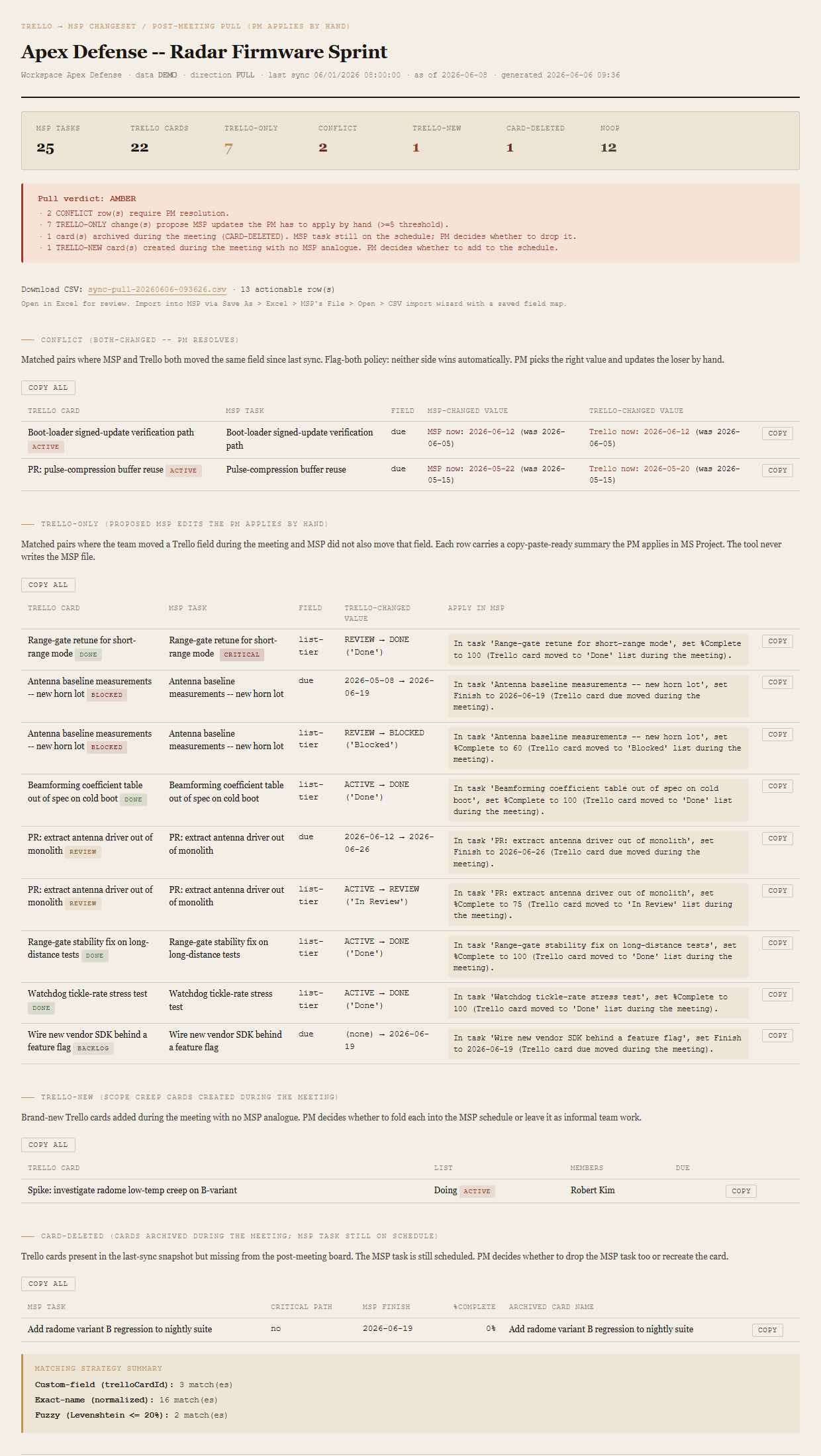
Pull mode also produces a CSV alongside the HTML — ten columns (MSP task name, MSP task ID, change type, field, current MSP value, proposed new value, Trello card ID, Trello list, conflict note, apply hint), UTF-8 with BOM and CRLF for Excel + MSP CSV-import compatibility, actionable rows only with one row per changed field. Each row in the HTML report also gets a COPY button that puts the apply-hint text on the clipboard, plus a Copy-all per table for batch use. Push mode doesn't produce a CSV — writes happen via the Trello API in execute mode.
The Drift Report is the diagnostic. This is the operation.
The MSP ↔ Trello Drift Report is the diagnostic — one-page audit, ad-hoc cadence, the artifact you generate when you want to know whether MSP and Trello agree right now and where they disagree. This Sync tool is the operation: weekly cadence, wrapped around the status meeting, push-and-pull workflow, surfaces the changes that need to be made and which side should make them. They share the same three-strategy matcher (custom-field trelloCardId, exact normalized name, fuzzy Levenshtein); they share the same flag-both conflict policy; they share the same don't-write-to-MSP discipline.
If you want a single sharable HTML page that answers "are we in sync?" for a PMO review, you generate the Drift Report. If you want to keep MSP and Trello reconciled across a weekly meeting cycle without doing the copy-paste by hand, you run Sync.
Four checks, two flags, one typed confirmation, an append-only audit log.
Live mode defaults to dry-run. The only way to fire a real Trello API write is to pass every safety rail in order. Each one fails closed: the default state is "do nothing destructive."
The four pre-flight rails
-Mode liveis required. The default isdemo, which has no network access at all. Demo runs can never opt in to writes —-Executeis invalid in demo mode and exits 1 before anything else.-Direction pushis required. Pull never writes regardless of any flag combination. The PM owns the MSP schedule of record; pull produces a copy-paste-ready changeset, not an automated MSP write.cache/last-sync.jsonmust exist. Without a baseline, push cannot tell what changed. If the file is missing,-Executeexits 1 with a "Run discover -Mode live first to establish a baseline before executing writes" message.- Write scope on the token is confirmed. A
GET /1/tokens/{token}?fields=permissionscall verifies the token haswrite: trueon the board model. Read-only tokens are rejected before any mutation.
The two-step Execute + Confirm gate
Past the four pre-flight rails, the actual write is gated by two separate flags. -Execute alone produces the same HTML preview as a dry-run and exits 0 with a note: writes NOT executed -- add -Confirm to fire. Only -Execute -Confirm together fires the real API calls. The flag separation is defense in depth: -Execute means "I want to do real writes"; -Confirm means "yes I've reviewed the preview and approve."
The builder UI mirrors the gate. The Execute push button is disabled until pre-flight and a dry-run preview both succeed. Clicking it opens a confirmation dialog showing the planned write count (N create, M update) and requires typing the literal string EXECUTE into a text input. The final Submit button stays disabled until the input matches exactly.
The audit log
Every API write appends two JSONL records to cache/audit-log.jsonl (gitignored, append-only). The first lands before the call fires with status: 'pending', a unique correlation ID, the function name, redacted parameters, and an ISO timestamp. The second lands after the call with the same correlation ID, status: 'success' or 'failure', the HTTP response code, and a body summary. If the tool crashes mid-batch, the log shows which writes were started but not confirmed, with enough detail to resume from the next correlation ID. The tool never prunes the log — the PM rotates manually if it grows too large. Tokens and API keys are redacted in every entry.
The tool never writes to MSP. Writes to Trello require all four flags.
The tool never writes to the MSP file, in any mode, with any flag. The PM owns the schedule of record; every MSP edit the pull report proposes is for the PM to apply by hand in MS Project. A future version may optionally emit a CSV changeset the PM can paste into a bulk-update MSP add-in, but the tool itself will not touch the schedule.
Trello writes happen only in the full -Mode live -Direction push -Execute -Confirm invocation — all four flags required. Any other combination produces an HTML preview and exits without firing API calls. Demo mode never writes; live dry-run never writes; pull never writes (in either mode, with either flag); -Execute alone produces only the preview. The combinatorial gating is deliberate: it should take a conscious decision to push real changes into Trello.
The tool does not enforce conflict resolution. The flag-both policy is intentional — BOTH-CHANGED cases surface as CONFLICT rows with both the MSP-now value and the Trello-now value visible side by side; the PM decides which one survives. Push leaves these fields alone (SKIP-RESPECT-TEAM) so the team's in-meeting edits are preserved.
The tool is not a replacement for the Drift Report (which remains the diagnostic) and it does not replace live status-meeting decisions.
30 to 60 minutes a week, predictable error rate, surfaces the wrong conflicts.
Weekly manual reconciliation between MSP and Trello takes 30 to 60 minutes when it's done well and zero minutes when it isn't — the kind of unglamorous bookkeeping that gets skipped first when the PM is busy. The tool produces a deterministic changeset in seconds against four files. More importantly, the conflicts that need human judgement get surfaced rather than buried: a manual eyeball pass tends to fix the easy disagreements and miss the BOTH-CHANGED ones, because BOTH-CHANGED rows look the same as MSP-OK rows when you're staring at the schedule alone.
Requirements
- OSWindows, macOS, or Linux
- RuntimePowerShell 7+ (
pwsh). Windows PowerShell 5.1 is not supported. - BrowserAnything modern. Configuration UI is on
localhost:8798. - MS ProjectDemo mode bundles a synthetic XML fixture — no Project install needed to try the tool. To run live against your own schedule, the PM's machine needs Project for a periodic File → Save As → XML Format.
- Trello (live mode)A Trello API key + token from trello.com/app-key and the 24-character board ID from the board's URL. Token must have write scope on the board for
-Execute -Confirmto fire; the tool runsGET /1/tokens/{token}?fields=permissionsto confirm before any write. - NetworkNone in demo. Live mode makes read GETs against the Trello API; live
-Execute -Confirmpush adds POST/PUT writes for the WOULD-CREATE and WOULD-UPDATE rows. - DataNever leaves your machine other than the explicit Trello API calls. Schedule sits on disk; reports are generated locally; you decide who gets the files.
Live mode setup
For the MSP path: drop the exported XML onto the builder's drop zone and the tool uploads it, sanitizes the filename, and auto-fills the path field. A Recent files dropdown beneath the input remembers the last five for one-click reuse. The Trello credentials and board ID still go through the config form; Test connection runs the pre-flight and surfaces the resolved board name before Live unlocks.
Claude could write this. Two reasons to prefer the script.
Some workplaces — defense, medical devices, finance, anywhere with a strict IT policy — won't let Claude or any AI tool touch production data. These tools run locally with no network calls. And even where AI is allowed, repeat workflows shouldn't cost tokens — a deterministic script runs the same way every time, for free, forever. The prompt guide below shows how this tool was built with Claude; the download is what you run after.
Four files. Free.
The tool itself is available two ways — as a Windows installer (Setup.exe) for users who'd rather not extract a zip and run PowerShell directly, and as a zip for users who want to read the scripts before running them. Plus a user guide that walks through the full weekly cadence (Monday morning push, status meeting, Monday evening pull, manual MSP edits) and a prompt guide showing how this was built with Claude — including the four-fixture design (MSP XML + two Trello snapshots + last-sync) that engineers both verdicts deterministically and the two-mode architecture wrapped around a real meeting cycle.
Drop your email to unlock the downloads.
One email when new tools ship, digest only. Confirms via Kit (double opt-in). No tracking. Unlocks every download on the site from this browser.
%LOCALAPPDATA%\Programs\msp-trello-sync\ — no admin required, no UAC prompt. Adds a Start Menu shortcut. Trello credentials and audit log land in %LOCALAPPDATA%\QuietLeverage\msp-trello-sync\. Unsigned for now, so Windows SmartScreen warns on first run — click "More info" then "Run anyway." PowerShell 7 is still required at runtime; the installer detects its absence and points you at the download../start.ps1.cache/last-sync.json), the four-fixture design where MSP and Trello have to be engineered together with a third snapshot mediating both, and the dual-report render (one HTML per mode) that surfaces the meeting cadence in the artifacts themselves.