Mirror integrity
A Monday.com mirror column goes blank silently. No error, no toast, no log entry — the cell just stops showing the value. Three different failure modes produce the same blank cell, and Monday's UI doesn't distinguish between them or surface that the mirror is broken at all. This tool walks every mirror on every board, resolves the source, checks the subscriber set, and flags each one as BROKEN, PERMISSION-GAP, COVERAGE-GAP, or HEALTHY — with executive and portfolio dashboards tiered first because that's where the silent blank cell does the most damage.
The cell goes blank. Different people see different blanks.
Monday's own support documentation acknowledges the failure mode. The article on mirror columns notes that mirrored values disappear silently when a viewer lacks subscriber access to the source board — the cell renders blank, no permission warning, no indication that anything is missing. The same board can show different mirror values to different people in the same workspace, depending on which subscribers are on the source. A separate Monday support article on broken mirrors documents the source-deleted case: when a source column is renamed or deleted on the upstream board, the downstream mirror cell goes blank with no error surfaced. In both cases the host board still looks fine on the surface — the column is still there, the mirror icon is still there — and the only signal that something is wrong is a viewer who happens to remember what value the cell used to show.
The connect_boards UI surfaces on/off state for the link itself but provides no view that says "this mirror has 5 subscribers who see blank cells and 7 who see real values," or "this mirror's source board was deleted three weeks ago." In a regulated-industry workspace where an executive dashboard board mirrors values from operational boards — program status, risk impact, vendor renewal — broken mirrors silently produce different "truth" for different viewers depending on which subscriber set they're in. The executive reading the portfolio dashboard sees a blank where their VP sees the actual status, and nobody finds out until a steering review where the numbers don't line up.
Three failure modes, a tier, a verdict roll-up, one page.
The three silent failure modes
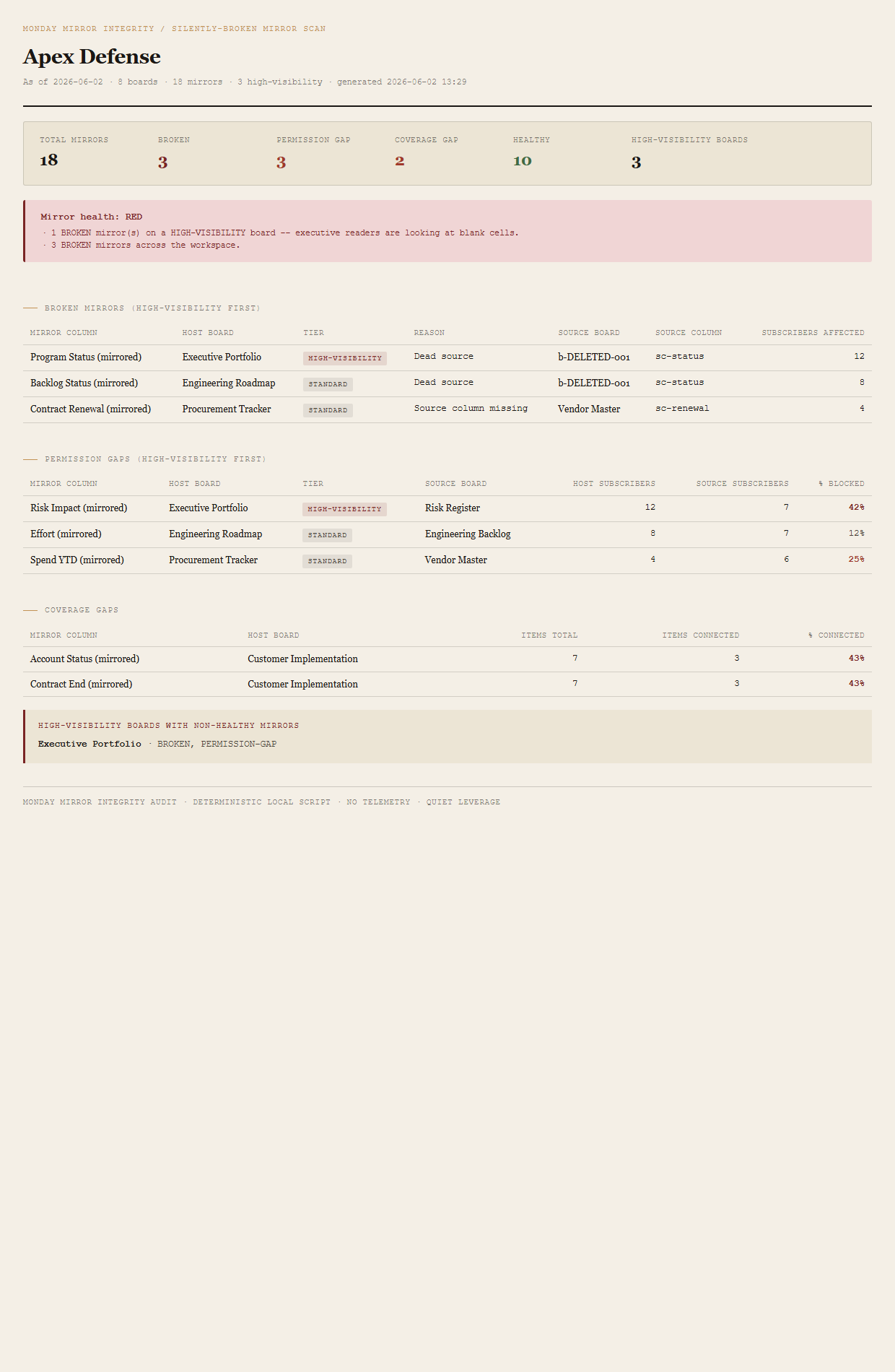
BROKEN -- Dead source) or the source board still exists but the specific mirrored column was deleted or renamed (handled as BROKEN -- Source column missing). Either way the mirror cell goes blank with no error. In the fixture, the Executive Portfolio's "Program Status (mirrored)" mirror points at a deleted source board, which is the case that drives the RED verdict.
blocked_subscribers / host_subscribers so a HIGH-VISIBILITY board with 5 of 12 subscribers blocked (42%) is flagged differently from a STANDARD board with 1 of 8 blocked (12%). The HIGH-VISIBILITY case in the fixture sits on Executive Portfolio.
connect_boards link to the source board. The column exists, the source resolves, the subscribers all have access — but most of the rows on the host board don't have any item connected to the source, so the cells are blank by design. In the fixture, Customer Implementation has 3 of 7 items connected (~43% connected, ~57% unconnected), which trips the 40% threshold.
HIGH-VISIBILITY board tiering
Every board is tiered as either HIGH-VISIBILITY or STANDARD based on a case-insensitive regex against its name: executive|leadership|portfolio|dashboard|board|exec. The tier affects the report's grouping (HIGH-VISIBILITY rows sort first inside every table), the verdict roll-up (any BROKEN mirror on a HIGH-VISIBILITY board promotes the workspace to RED on its own), and the high-visibility callout block at the bottom of the page. STANDARD boards are everything else — backlogs, operational trackers, departmental workstreams. The fixture's three HIGH-VISIBILITY boards are Executive Portfolio, PMO Leadership Dashboard, and Q3 Executive Review.
Verdict roll-up (precedence)
A single workspace-level verdict, set by the worst-fired threshold. Per-mirror verdict precedence is BROKEN > PERMISSION-GAP > COVERAGE-GAP > HEALTHY — every mirror gets exactly one verdict.
- REDAny BROKEN mirror on a HIGH-VISIBILITY board, OR 3+ BROKEN mirrors total.
- AMBERAny BROKEN mirror exists, OR any HIGH-VISIBILITY board has a PERMISSION-GAP affecting > 20% of subscribers, OR 5+ PERMISSION-GAP mirrors total.
- GREENNo BROKEN mirrors; no HIGH-VISIBILITY permission gaps above review threshold.
The bundled fixture lands on RED because the Executive Portfolio has a BROKEN mirror; the workspace also has 3 BROKEN total (which would trip RED independently) and a HIGH-VISIBILITY permission gap at 42% (which would trip AMBER independently). The reason list captures all three so the reader sees every overlapping trigger.
What ends up on the page
Summary header (total mirrors, broken count, permission-gap count, coverage-gap count, healthy count, high-visibility-board count). Mirror-health verdict (RED/AMBER/GREEN) with named reasons. Broken-mirrors table, HIGH-VISIBILITY rows first — columns for mirror column, host board, tier, reason, source board, source column, subscribers affected. Permission-gaps table, HIGH-VISIBILITY first — columns for mirror column, host board, tier, source board, host subscribers, source subscribers, % blocked. Coverage-gaps table — columns for mirror column, host board, items total, items connected, % connected. High-visibility boards callout naming each executive/portfolio board with any non-healthy mirror.
The honest scope of v1.
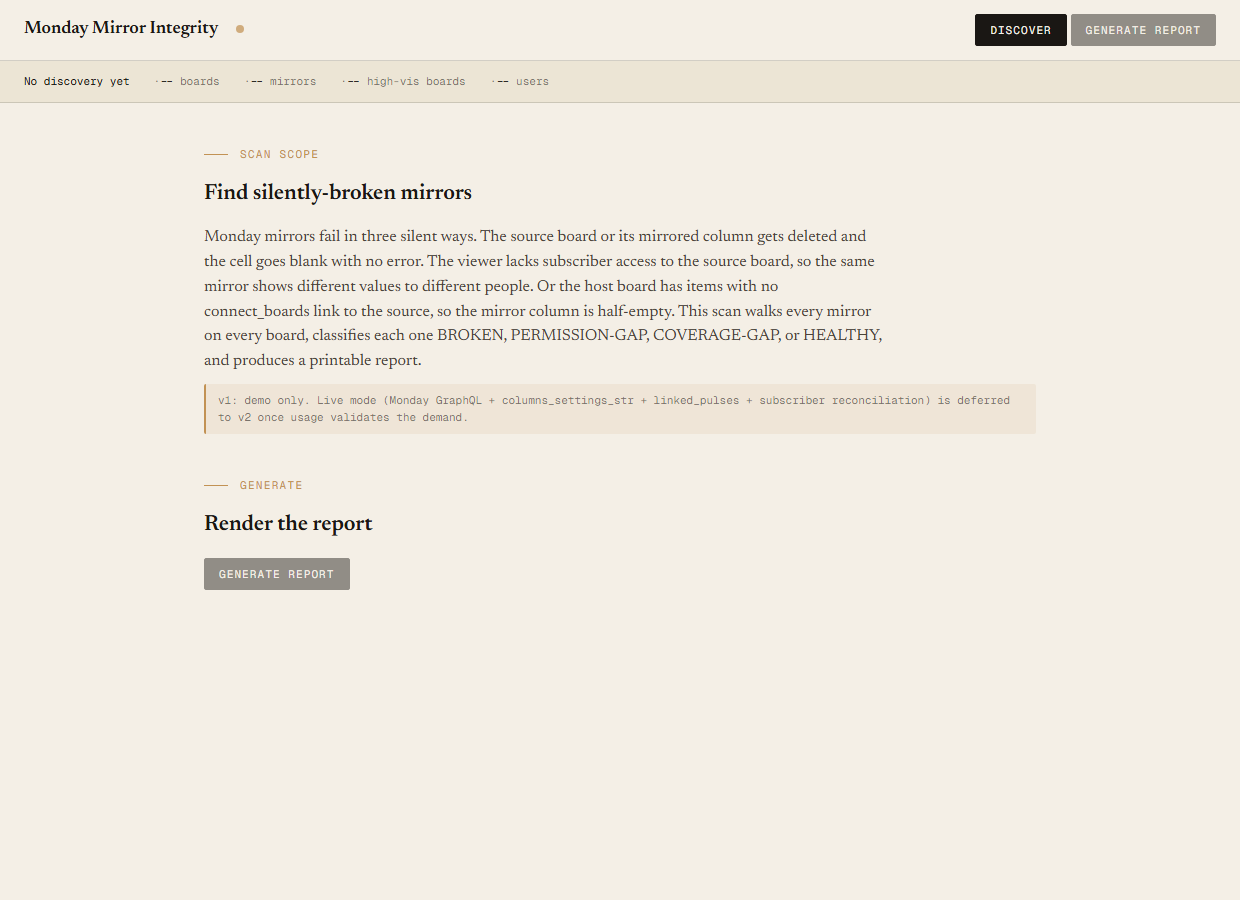
v1 is demo mode only. The discover script reads the bundled sample-data/mirrors.json fixture — an Apex Defense workspace with 8 boards (3 HIGH-VISIBILITY, 5 STANDARD), 18 mirror columns, 12 users. You can evaluate the report shape, the three failure-mode classifications, the verdict logic, and the HIGH-VISIBILITY tiering end-to-end with no Monday credentials. Live mode (Monday GraphQL walk of columns_settings_str for mirrors + linked_pulses for connect_boards coverage + per-board subscriber reconciliation) is deferred to v2 once usage validates the demand.
Read-only audit, no API writes. The tool tells you which mirrors are silently broken and which board they sit on; it does not delete the dead links, doesn't repair the connect_boards relationships, doesn't add the blocked subscribers to the source board. The output is a single self-contained HTML file. v1 is read-only by design.
Not a replacement for the connect_boards UI — it's an audit of it. Monday's connect_boards UI is fine for setting up a mirror; it just doesn't surface whether the mirror is producing values for every viewer in every subscriber set. This tool runs alongside the UI, on a cadence (weekly, before steering reviews, before executive readouts), to show where the connect_boards link is on but the mirror cell is blank.
Group-level mirrors and subitem mirrors are out of scope for v1. The coverage-gap check only looks at item-level connect_boards. Subitem mirrors and group-restricted mirrors land in v2 once their GraphQL shape is validated. The cross-account / shareable-board permission model is also v2 territory — v1 assumes a single workspace's subscriber set is the only access control.
The UI shows the link. The audit shows whether the link is working.
Monday's connect_boards UI surfaces on/off state for each link, but there is no view in-product that says "this mirror has 5 subscribers who see a blank cell and 7 who see the value," or "this mirror's source board was deleted and the cell has been blank for three weeks." The audit walks every mirror, resolves the source, checks the subscriber set against the host's subscriber set, and lands each result in a sortable table next to the board it lives on — with HIGH-VISIBILITY dashboards first because that's where a silent blank cell does the most damage.
Requirements
- OSWindows, macOS, or Linux
- RuntimePowerShell 7+ (
pwsh). 5.1 is not supported. - BrowserAnything modern. UI on
localhost:8791. - MondayLive mode deferred to v2 — will use Monday GraphQL (
api.monday.com/v2) walkingcolumns_settings_str+linked_pulses+ per-board subscriber reconciliation. v1 demonstrates the report shape on a bundled fixture. - Demo modeBundled 8-board / 18-mirror / 12-user / 3-HIGH-VISIBILITY Apex Defense fixture — runs end-to-end with no creds.
Three files. Free.
The tool, a user guide, and a prompt guide showing the spec, the three-failure-mode classification math, the fixture engineering that pins the per-verdict counts, the Pester contract, and the HTML rendering.
Drop your email to unlock the downloads.
One email when new tools ship, digest only. Confirms via Kit (double opt-in). No tracking. Unlocks every download on the site from this browser.
./start.ps1.