Workload truth
Monday's native Workload widget gets four things wrong, all silently. Subitem assignments are invisible to it. Items in Done-equivalent status groups still count toward the capacity bar. Team-column assignments register against a single 40hr bucket instead of N members × daily hours. And the widget's working-day math ignores holidays in a person's schedule, so a holiday week reads as artificial over-utilization. This tool recomputes utilization with all four corrections and shows the "widget says X / reality is Y" delta per person and per team.
The widget says on-track. The person is drowning.
Two threads on community.monday.com surface the failure mode in the customers' own words. The first — "Workload wrong — team capacity and status completed not considered" — documents two of the four flaws on a single board: Done items keep contributing to the capacity bar even after they're closed out, and items assigned to a Team column register against a single 40hr bucket instead of being divided across the team's active members. The second — "Workload widget with schedules does not calculate utilisation correctly" — documents the holiday-math artifact: a person whose work schedule excludes a public holiday in the window gets normalized against the un-adjusted calendar and the widget shows 125% utilization when the underlying hours are actually fine. The subitem blindness is documented in multiple support discussions in the same forum — subitems are architecturally separate from parent items in the Workload widget's data model, and there is no toggle to include them.
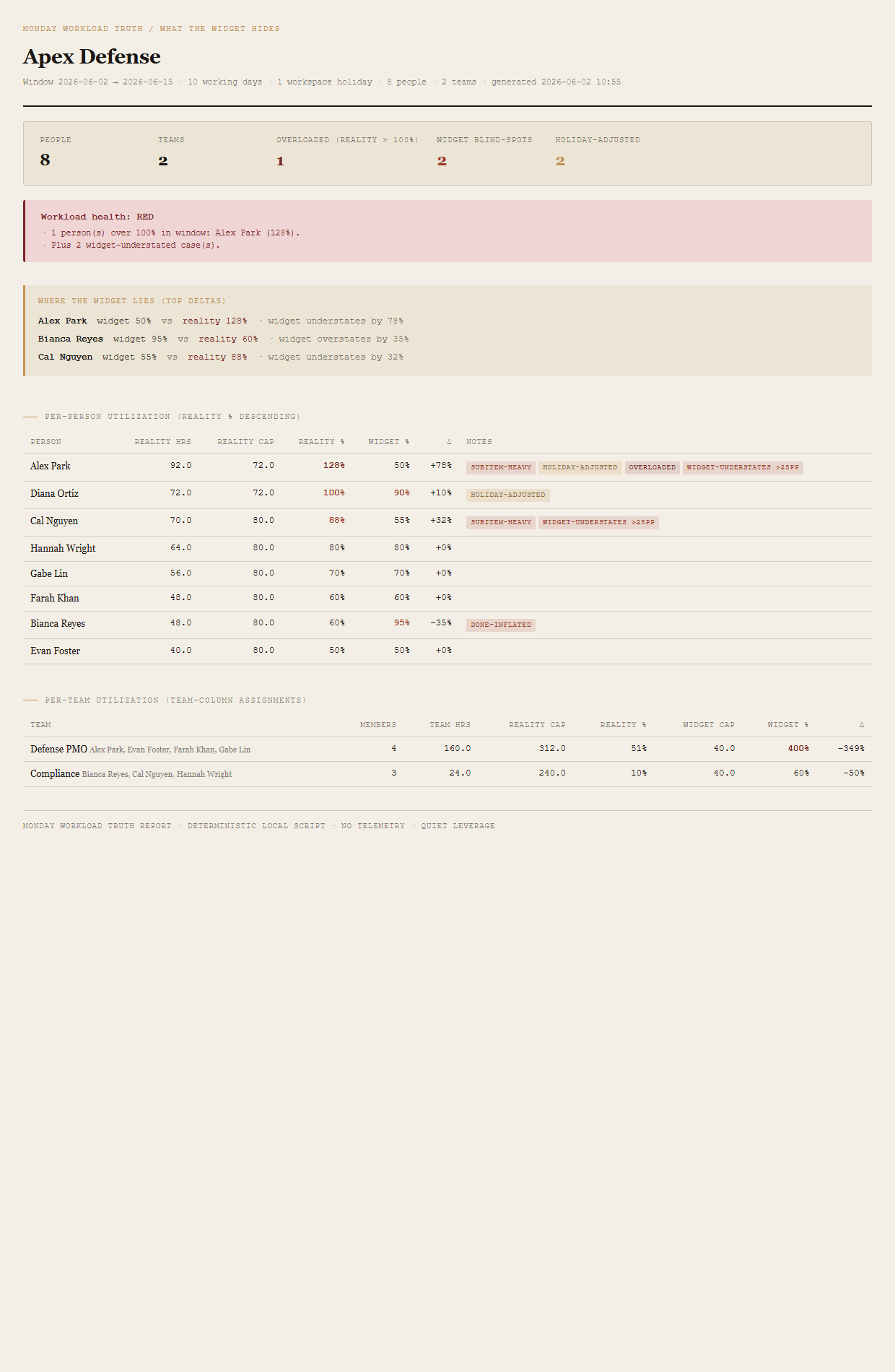
The shape of the pain is the same across all four. A team lead opens the Workload widget to decide who's underwater and who has bandwidth. The widget says everyone's on track. A week later somebody quits or misses a deadline, and the post-mortem turns up the same conversation: they were at 128% the whole time, but the widget only saw 50% because half their effort lived in subitems. Or: the widget said the team was 400% over because every team-column item dumped into a 40hr bucket, and the lead spent a quiet morning trying to figure out which assignments to undo before realizing the math was wrong. The widget's blind spots aren't configurable away — subitems are architecturally separate from parents in the widget's data model, and the team-capacity-as-40hr behavior is documented as "by design" in multiple support threads. Re-doing the math outside Monday is the only way to see the corrected number.
Four corrections, a verdict roll-up, one page.
The four widget corrections
Done|Complete|Closed|Archived by default, configurable per fixture). The widget keeps Done items in the bar, which is what inflates Bianca Reyes to widget 95% when her reality is 60%.
Verdict roll-up
One workspace-level verdict, set by the worst-fired threshold:
- REDAny person's reality utilization > 100% OR any team's reality utilization > 100%.
- AMBERWidget understates any person's utilization by > 25 percentage points OR any person's subitem hours are ≥ 50% above parent hours.
- GREENNo reality overloads, widget and reality agree within 25 percentage points across all people.
The bundled fixture lands on RED via Alex Park (128% reality), with an AMBER widget-understates trigger appended to the reason list so the reader knows both failure modes were observed in the same workspace.
What ends up on the page
Summary header (people, teams, overloaded count, widget-blindspot count, holiday-adjusted count). Workload-health verdict (RED/AMBER/GREEN) with named reasons. "Where the widget lies" callout naming the top three absolute widget-vs-reality deltas. Per-person utilization table sorted by reality % descending — columns for reality hours, reality cap, reality %, widget %, delta, and per-row notes (OVERLOADED, widget-understates >25pp, done-inflated, subitem-heavy, holiday-adjusted). Per-team utilization table — columns for member count, team hours, reality cap, reality %, widget cap, widget %, delta.
The honest scope of v1.
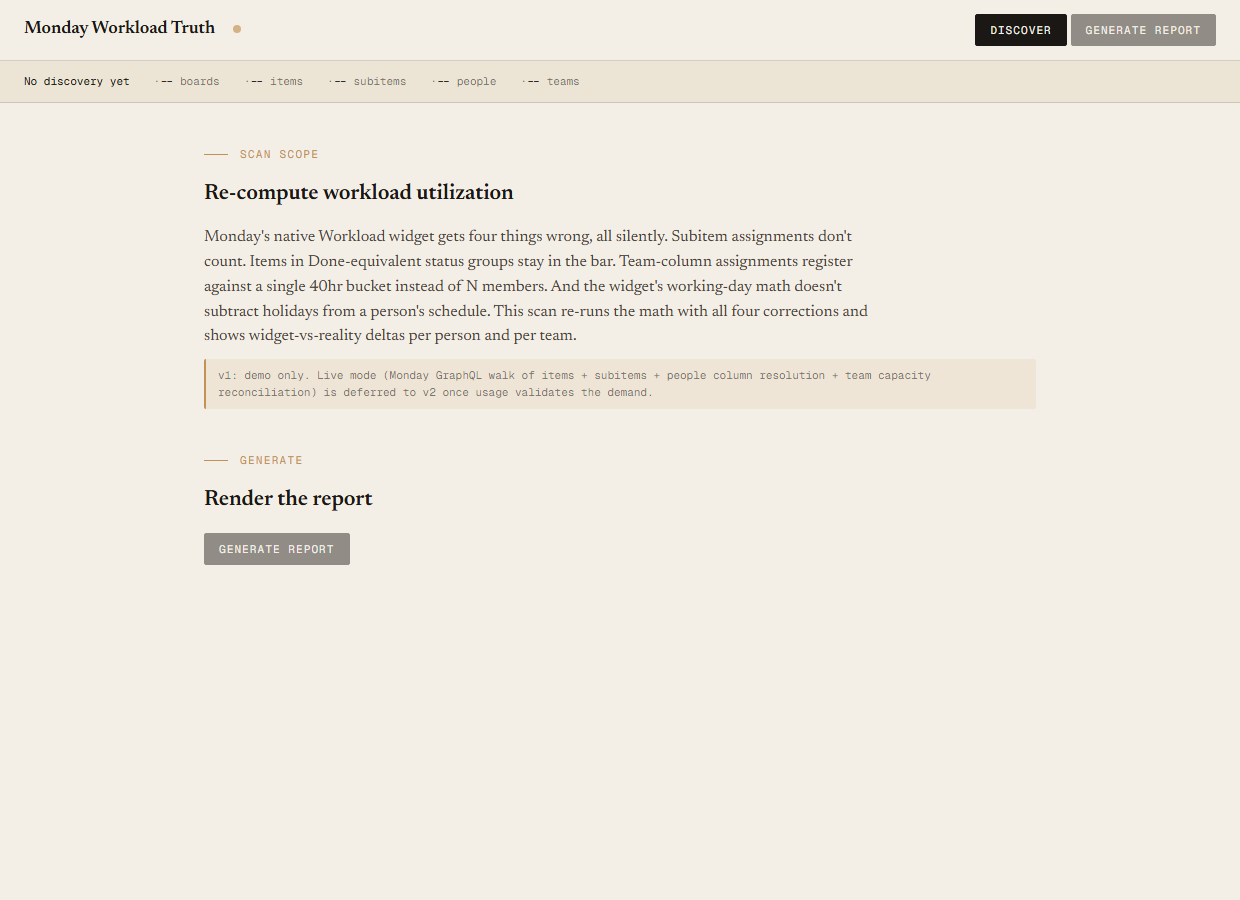
v1 is demo mode only. The discover script reads the bundled sample-data/workload.json fixture — an Apex Defense workspace with 4 boards, 35 parent items, 28 subitems, 8 active people, 2 teams (Defense PMO with 4 members, Compliance with 3), and one workspace holiday inside the 14-day window. You can evaluate the report shape, the four corrections, the verdict logic, and the per-row notes end-to-end with no Monday credentials. Live mode (Monday GraphQL walk of items + subitems + people-column resolution + team capacity reconciliation) is deferred to v2 once usage validates the demand.
Read-only audit. The tool tells you which utilization numbers are wrong and by how much; it does not write back to Monday, doesn't fix assignments, doesn't suggest who to move work to. The output is a single self-contained HTML file. v1 is read-only by design.
Not a replacement for the widget — it's an audit of the widget. The Workload widget still has a place in day-to-day flow; this tool runs alongside it, on a cadence (weekly, before sprint planning, before staffing decisions), to show where the widget number is misleading. The report shows the widget % and the reality % side-by-side so the reader can see how far off the in-product number is on every row.
No alternative-assignment simulation. v1 reports the corrected numbers; it does not propose what to reassign or to whom. The reader looks at the rows where reality % is over 100, decides what to move, and makes the move in Monday by hand. Bulk-fix or "what-if" simulation is out of scope for v1.
Native shows the wrong number. The audit shows it next to the right one.
Monday's Workload widget reports a utilization figure derived from four inputs that are wrong by default — subitems missing, Done items still counted, team capacity treated as a single 40hr bucket, holidays ignored. The widget number is what the team lead sees; the corrected number is the one the staffing decision should be based on. The audit shows both, on the same row, with the delta in between, so the reader can see exactly which people the widget is lying about and by how much.
Requirements
- OSWindows, macOS, or Linux
- RuntimePowerShell 7+ (
pwsh). 5.1 is not supported. - BrowserAnything modern. UI on
localhost:8790. - MondayLive mode deferred to v2 — will use Monday GraphQL (
api.monday.com/v2) walking items + subitems + people column + team column. v1 demonstrates the report shape on a bundled fixture. - Demo modeBundled 8-person / 2-team / 4-board / 35-parent-item / 28-subitem Apex Defense fixture — 14-day window, 10 working days, 1 holiday — runs end-to-end with no creds.
Three files. Free.
The tool, a user guide, and a prompt guide showing the spec, the four-correction math, the fixture engineering that pins the per-person and per-team numbers, the Pester contract, and the HTML rendering.
Drop your email to unlock the downloads.
One email when new tools ship, digest only. Confirms via Kit (double opt-in). No tracking. Unlocks every download on the site from this browser.
./start.ps1.